

How Does Edge AI Work? Architecture, Components, and Data Flow Explained
 Suyash Raizada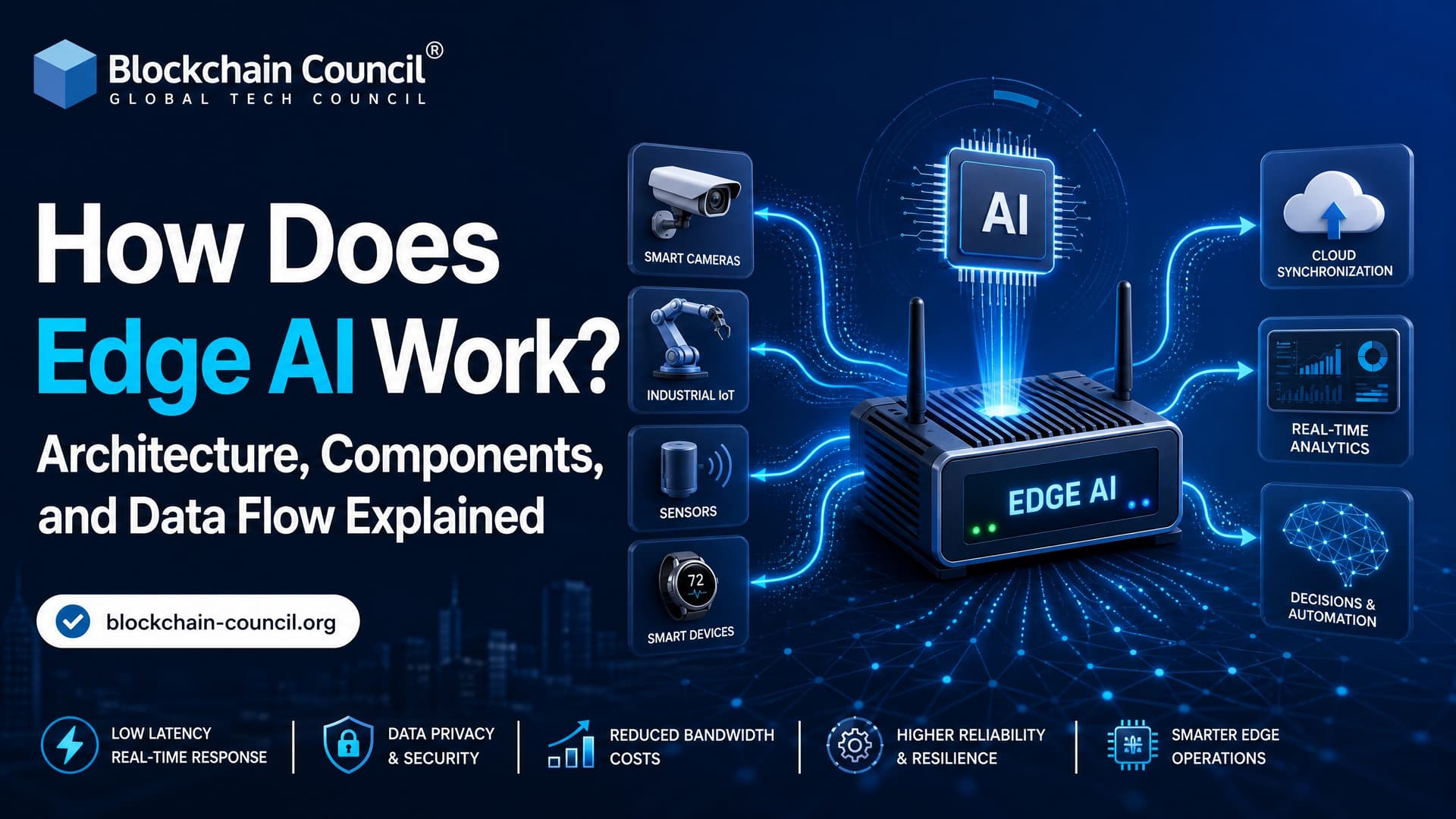
How does Edge AI work? It runs trained machine learning models on or near the device where data is created, so the system can sense, process, decide, and act locally. Instead of sending every video frame, vibration reading, or heart-rate signal to a distant cloud server, Edge AI runs inference close to the source.
That shift sounds simple. It is not. A working Edge AI system needs sensors, edge processors, optimized models, networking, security controls, monitoring, and a cloud loop for training and updates. Think of it as a distributed architecture: the edge handles time-sensitive decisions, while the cloud handles heavy training, fleet analytics, storage, and long-term model improvement.

As Edge AI adoption accelerates across manufacturing, healthcare, transportation, and smart infrastructure, professionals with a Certified Edge AI Expert credential are increasingly helping organizations design low-latency AI architectures that balance performance, privacy, and scalability in real-world deployments.
What Is Edge AI?
Edge AI is the deployment of AI models on edge devices such as cameras, IoT gateways, industrial controllers, vehicles, phones, drones, medical wearables, or nearby edge servers. These devices process data locally and return predictions without waiting for a cloud round trip.
Cloud AI works well when latency is not critical. Monthly sales forecasting or batch document classification can run centrally with no problem. But a robotic arm avoiding a human worker cannot wait for a server hundreds of miles away. A smart traffic light cannot stream every frame forever. A wearable that spots an abnormal heart rhythm should alert fast, even with poor connectivity.
That is where Edge AI fits best: low-latency, high-volume, privacy-sensitive, or connectivity-limited environments.
How Edge AI Works: The Short Version
Most Edge AI systems follow a four-stage process:
Data collection: Sensors capture video, audio, temperature, vibration, GPS, pressure, medical signals, or machine telemetry.
Local preprocessing and inference: The edge device cleans the input, converts it into the right format, and runs it through an optimized model.
Decision and action: The output triggers an alert, control signal, rejection event, route change, lock action, or dashboard update.
Selective cloud sync: Summaries, events, logs, or selected clips go to the cloud for monitoring, retraining, and model management.
Here is the key point. The cloud is still involved, but it is not in the critical path for every decision.
Edge AI Architecture: Main Layers
A practical Edge AI architecture is usually built in layers. The names vary by vendor, but the structure stays consistent across industrial and research systems.
Building these layered Edge AI architectures also requires disciplined model lifecycle management. From version control and deployment automation to monitoring and continuous optimization across distributed devices, professionals often strengthen these operational capabilities through a Certified MLOps Expert program to ensure production AI systems remain reliable and scalable.
1. Perception Layer: Sensors and Data Sources
This is where raw data begins. Common sources include:
Cameras on production lines, roads, stores, or security systems
Microphones in consumer devices or industrial monitoring setups
Vibration and temperature sensors on motors, pumps, and turbines
Wearable sensors for heart rate, oxygen levels, movement, and sleep
Vehicle sensors such as LiDAR, radar, GPS, and wheel speed signals
Data volume matters here. A single 1080p camera at 30 frames per second produces far more data than a temperature sensor sending one reading per minute. That gap changes the whole architecture.
2. Edge Device Layer
The edge device is the first compute point. It may be a smart camera, a Raspberry Pi class board, a smartphone, a PLC, an NVIDIA Jetson module, an industrial gateway, or a microcontroller.
This layer often handles:
Noise filtering
Image resizing and cropping
Audio feature extraction
Signal normalization
Lightweight model inference
Immediate device-level action
A practical detail: beginners often train a model in PyTorch or TensorFlow and assume it will run unchanged on a small device. It usually will not. Convert a TensorFlow model to TensorFlow Lite int8 without a representative dataset for calibration, and accuracy can drop hard, especially on camera feeds with changing lighting. The model may deploy fine and still fail in the field. That kind of failure is common.
3. Edge Gateway Layer
An edge gateway collects data from multiple devices in a local site, such as a factory, hospital wing, farm, or retail store. It can do protocol translation, caching, encryption, rule processing, and moderate AI inference.
Gateways earn their place when each sensor is too small to run a model, but the site still needs local decisions. For example, ten vibration sensors may push streams to a gateway that runs anomaly detection for a pump room.
4. Edge Server or Local Edge Cloud
Some models are too large for individual devices. In that case, inference runs on a nearby server, an on-premises micro data center, or a 5G multi-access edge computing site.
This layer supports containerized workloads, multiple video streams, lower-latency analytics, local storage, and orchestration. It shows up often in smart manufacturing, smart cities, and retail computer vision systems.
5. Network Layer
The network connects sensors, devices, gateways, edge servers, and cloud services. It may use Ethernet, Wi-Fi, 5G, satellite, LoRaWAN, Bluetooth Low Energy, or industrial protocols.
The design choice is not just speed. You also have to weigh jitter, packet loss, data cost, power draw, security policy, and whether the system must keep working when the link is down.
6. Cloud and Application Layer
The cloud is still central to Edge AI. It usually handles:
Large-scale model training and retraining
Fleet-wide analytics
Model registry and versioning
Long-term data storage
Security policy management
Remote deployment and monitoring
In a mature setup, the cloud trains or fine-tunes the model, exports it to an edge-friendly format, and pushes it to devices. Devices then send back selected events and performance signals.
Edge AI Data Flow: From Sensor to Action
Here is the typical data flow in an Edge AI system.
Step 1: Data Is Generated
A sensor captures raw input. In a factory, that might be vibration data from a motor. In a smart city, it might be traffic camera footage. In healthcare, it might be ECG or movement data from a wearable.
Step 2: The Device Preprocesses the Input
The system cuts noise and converts data into model-ready form. A camera pipeline may resize frames from 1920x1080 to 224x224 pixels. A sensor pipeline may compute frequency-domain features from vibration data.
Step 3: The Model Runs Local Inference
The AI model returns a prediction, classification, detection box, anomaly score, or control recommendation. Common model types include convolutional neural networks for vision, temporal models for time series, and smaller transformer variants where hardware allows.
To fit edge hardware, teams use techniques such as:
Quantization: Reducing weights and activations from 32-bit floating point to 8-bit or sometimes 4-bit formats.
Pruning: Removing less useful weights, channels, or connections.
Knowledge distillation: Training a smaller student model to imitate a larger teacher model.
Architecture simplification: Choosing a simpler model when the business problem does not justify a deep network.
To be blunt, the best edge model is not always the most accurate model on a benchmark. It is the model that meets latency, memory, power, safety, and maintenance requirements in the real environment.
Step 4: Application Logic Takes Action
The model output feeds into decision logic. Examples:
Stop a machine when vibration crosses an anomaly threshold
Trigger a quality-control rejection on a production line
Send an alert when a restricted-area camera detects a person
Adjust traffic signals based on congestion
Notify a clinician when a wearable detects a concerning pattern
This step often combines AI with rules. That is a good thing. For safety-critical systems, do not let a model act alone without guardrails.
Step 5: Local Storage and Buffering
Edge systems often store recent events, logs, and selected raw data locally. This helps when connectivity drops. It also gives engineers the evidence they need when a model behaves oddly in production.
Step 6: Selected Data Goes to the Cloud
Instead of uploading everything, the system sends event summaries, metadata, suspicious clips, model confidence scores, or aggregated statistics. That cuts bandwidth cost and can reduce exposure of sensitive raw data.
Step 7: Models Are Retrained and Redeployed
The cloud uses new data to detect drift, retrain models, test versions, and push updates. This closed loop is how Edge AI improves over time. Without it, field accuracy tends to decay as lighting, equipment, user behavior, and operating conditions change.
Where Edge AI Is Used Today
Edge AI is already practical across several sectors:
Manufacturing: Predictive maintenance, defect detection, worker safety, and robotics coordination.
Smart cities: Traffic management, pollution monitoring, energy optimization, and public safety alerts.
Retail: Smart checkout, shelf monitoring, queue analytics, and loss prevention.
Energy and utilities: Grid monitoring, pipeline inspection, renewable asset management, and anomaly detection.
Healthcare: Wearables, point-of-care diagnostics, hospital equipment monitoring, and clinical alerts.
Transportation: Driver assistance, autonomous systems, route optimization, and roadside edge intelligence.
Reviews of Edge AI keep pointing to the same performance goals: real-time response, privacy, energy efficiency, scalability, adaptability, and reliability.
Benefits and Trade-Offs
Why Organizations Use Edge AI
Lower latency: Decisions happen near the source.
Lower bandwidth use: Only useful events or summaries move upstream.
Better privacy posture: Sensitive data can stay local.
Offline resilience: Systems can keep running during network outages.
Faster local automation: Machines, vehicles, and devices can respond in milliseconds.
Where Edge AI Is the Wrong Choice
Edge AI is not always the answer. If your workload is batch-based, compute-heavy, and not latency-sensitive, cloud AI may be simpler and cheaper. If your model changes every hour, managing thousands of edge deployments gets painful fast. If your team has no device monitoring or rollback process, start small.
Hardware constraints bite too. Memory, heat, battery life, and accelerator compatibility decide what you can actually ship. A model that runs on a developer laptop can fail on a device because one operation is unsupported by the target runtime.
Skills You Need to Build Edge AI Systems
Building Edge AI well takes more than model training. Focus on these areas:
Machine learning fundamentals and model evaluation
Model compression, quantization, and deployment formats such as ONNX and TensorFlow Lite
IoT architecture, sensors, gateways, and networking
Container deployment and device fleet monitoring
Security controls for data, firmware, models, and remote updates
Cloud training pipelines and MLOps practices
If you are mapping out a learning path, Blockchain Council's Certified Artificial Intelligence (AI) Expert™ gives you a solid AI foundation. If your Edge AI system touches decentralized identity, device audit trails, or blockchain-based data integrity, the Certified Blockchain Expert™ is worth a look as a complement.
What Comes Next for Edge AI?
The next phase is hybrid. Edge devices handle fast inference, while cloud and 5G edge nodes coordinate broader learning, analytics, and policy enforcement. Federated learning will also grow where privacy rules make centralized raw-data collection difficult.
Your next step: pick one real edge problem, such as camera-based defect detection or vibration anomaly detection, and design the full loop. Define the sensor, latency target, model size, runtime, update process, and cloud feedback path before you train anything. That discipline is what separates a demo from a deployable Edge AI system.
As Edge AI continues moving from technical innovation to enterprise adoption, professionals involved in product strategy, technology consulting, or commercial growth can complement their technical expertise with a Marketing Certification to better communicate the business value of Edge AI solutions and support successful market adoption across industries.
FAQs
1. What is Edge AI and how does it work?
Edge AI is the deployment of artificial intelligence models directly on edge devices, gateways, or local servers instead of relying entirely on cloud computing. It works by collecting data from sensors or devices, processing it locally using trained AI models, making real-time decisions, and only sending necessary information to the cloud when required.
2. What are the main components of an Edge AI system?
A typical Edge AI system consists of data sources (such as sensors and cameras), edge devices, AI models, processors or AI accelerators, edge gateways, edge servers, communication networks, cloud platforms, and management software. Together, these components enable intelligent local data processing and automation.
3. What is the architecture of Edge AI?
Edge AI architecture generally includes four layers: data collection, local processing, edge computing, and cloud integration. Data is captured by sensors, processed by AI models on edge hardware, optionally coordinated by edge gateways or servers, and synchronized with cloud platforms for storage, analytics, or model updates.
4. How does data flow in an Edge AI system?
Data flows from sensors or connected devices to an edge processor, where an AI model performs inference. Based on the result, the system may trigger an action, store the result locally, or send selected information to an edge server or cloud platform for additional analysis and long-term storage.
5. What role do sensors play in Edge AI?
Sensors collect real-time information such as images, video, sound, temperature, vibration, pressure, humidity, motion, and location. This raw data becomes the input for AI models that analyze conditions and support automated decision-making.
6. What are edge devices in Edge AI?
Edge devices are physical systems that generate data and perform AI inference. Examples include smart cameras, smartphones, industrial robots, wearable devices, medical equipment, autonomous vehicles, drones, IoT sensors, and embedded computers.
7. What is an edge gateway?
An edge gateway connects multiple edge devices and manages communication between local equipment and cloud platforms. It aggregates data, filters unnecessary information, performs preprocessing, enhances security, and helps coordinate distributed Edge AI deployments.
8. What is the role of edge servers?
Edge servers provide additional computing power for AI workloads that exceed the capabilities of individual edge devices. They can process data from multiple devices simultaneously, support larger AI models, and enable localized analytics for factories, hospitals, retail stores, and smart cities.
9. What is AI inference in Edge AI?
AI inference is the process of using a trained machine learning model to analyze new data and generate predictions or decisions. In Edge AI, inference occurs locally on edge hardware, allowing systems to respond almost instantly without waiting for cloud processing.
10. How are AI models deployed to edge devices?
AI models are typically trained in cloud or data center environments using large datasets. Before deployment, models are optimized through techniques such as quantization and pruning, then transferred to edge devices or servers for efficient local inference.
11. What hardware is commonly used in Edge AI?
Edge AI hardware includes CPUs, GPUs, Neural Processing Units (NPUs), AI accelerators, NVIDIA Jetson devices, Google Coral Edge TPU, Intel processors, ARM-based chips, Raspberry Pi, industrial PCs, embedded systems, and IoT gateways.
12. How does Edge AI reduce latency?
Edge AI processes data close to where it is generated instead of sending it to distant cloud servers. This eliminates network delays and enables real-time responses for applications such as robotics, autonomous vehicles, industrial automation, and medical monitoring.
13. How does Edge AI improve data privacy?
Since sensitive data can remain on local devices, Edge AI reduces the need to transmit confidential information across external networks. This minimizes exposure to cyber threats and supports compliance with data privacy regulations.
14. Can Edge AI work without internet connectivity?
Yes. Edge AI systems can continue performing AI inference locally during network outages. Devices can operate independently and synchronize selected data with cloud systems when connectivity becomes available again.
15. Which AI frameworks support Edge AI deployment?
Developers commonly use TensorFlow Lite, TensorFlow Lite Micro, ONNX Runtime, OpenVINO, NVIDIA TensorRT, PyTorch Mobile, Apache TVM, Edge Impulse, MediaPipe, and TinyML frameworks for optimized edge deployment.
16. What industries use Edge AI?
Edge AI is widely adopted in manufacturing, healthcare, retail, logistics, automotive, agriculture, telecommunications, energy, financial services, smart cities, industrial IoT, robotics, and defense for applications requiring low-latency intelligence.
17. What are the biggest challenges of Edge AI architecture?
Challenges include hardware limitations, power consumption, AI model optimization, cybersecurity, software updates, device management, interoperability, network reliability, scalability, and integrating with legacy enterprise systems.
18. What are the best practices for building an Edge AI system?
Best practices include selecting appropriate hardware, optimizing AI models, securing edge devices, encrypting communications, implementing centralized monitoring, managing software updates, validating AI performance, and designing scalable edge architectures.
19. How does Edge AI work with cloud computing?
Edge AI performs real-time inference locally, while cloud computing handles AI model training, centralized device management, long-term data storage, analytics, software updates, and enterprise-wide reporting. Most modern deployments use a hybrid edge-cloud architecture.
20. Why is understanding Edge AI architecture important?
Understanding Edge AI architecture helps businesses design efficient, secure, and scalable AI systems. Knowing how devices, sensors, gateways, edge servers, AI models, and cloud platforms interact enables organizations to build applications that deliver real-time intelligence, improve operational efficiency, strengthen privacy, and reduce infrastructure costs. As Edge AI adoption grows across industries, a solid understanding of its architecture and data flow is essential for successful AI implementation and long-term digital transformation.
Related Articles
View All
Edge Ai
Edge AI Architecture Explained: Devices, Gateways, Models, and Edge Servers
Edge AI architecture explained across devices, gateways, models, edge servers, and cloud, with real deployment patterns, trade-offs, and use cases.

Edge Ai
Edge AI Security Best Practices for Devices, Data, Models, and Networks
Learn Edge AI security best practices for protecting devices, data, models, and networks with zero trust, encryption, attestation, and monitoring.

Edge Ai
Edge AI Hardware Explained: Chips, Sensors, GPUs, NPUs, and Edge Devices
A practical guide to edge AI hardware, covering sensors, CPUs, GPUs, NPUs, FPGAs, ASICs, edge devices, benchmarks, and selection trade-offs.
Trending Articles
AWS Career Roadmap
A step-by-step guide to building a successful career in Amazon Web Services cloud computing.

Top 5 DeFi Platforms
Explore the leading decentralized finance platforms and what makes each one unique in the evolving DeFi landscape.

Can DeFi 2.0 Bridge the Gap Between Traditional and Decentralized Finance?
The next generation of DeFi protocols aims to connect traditional banking with decentralized finance ecosystems.