

Building an AI-Powered Incident Response Runbook with Claude AI for Faster Triage, RCA, and Postmortems
 Suyash Raizada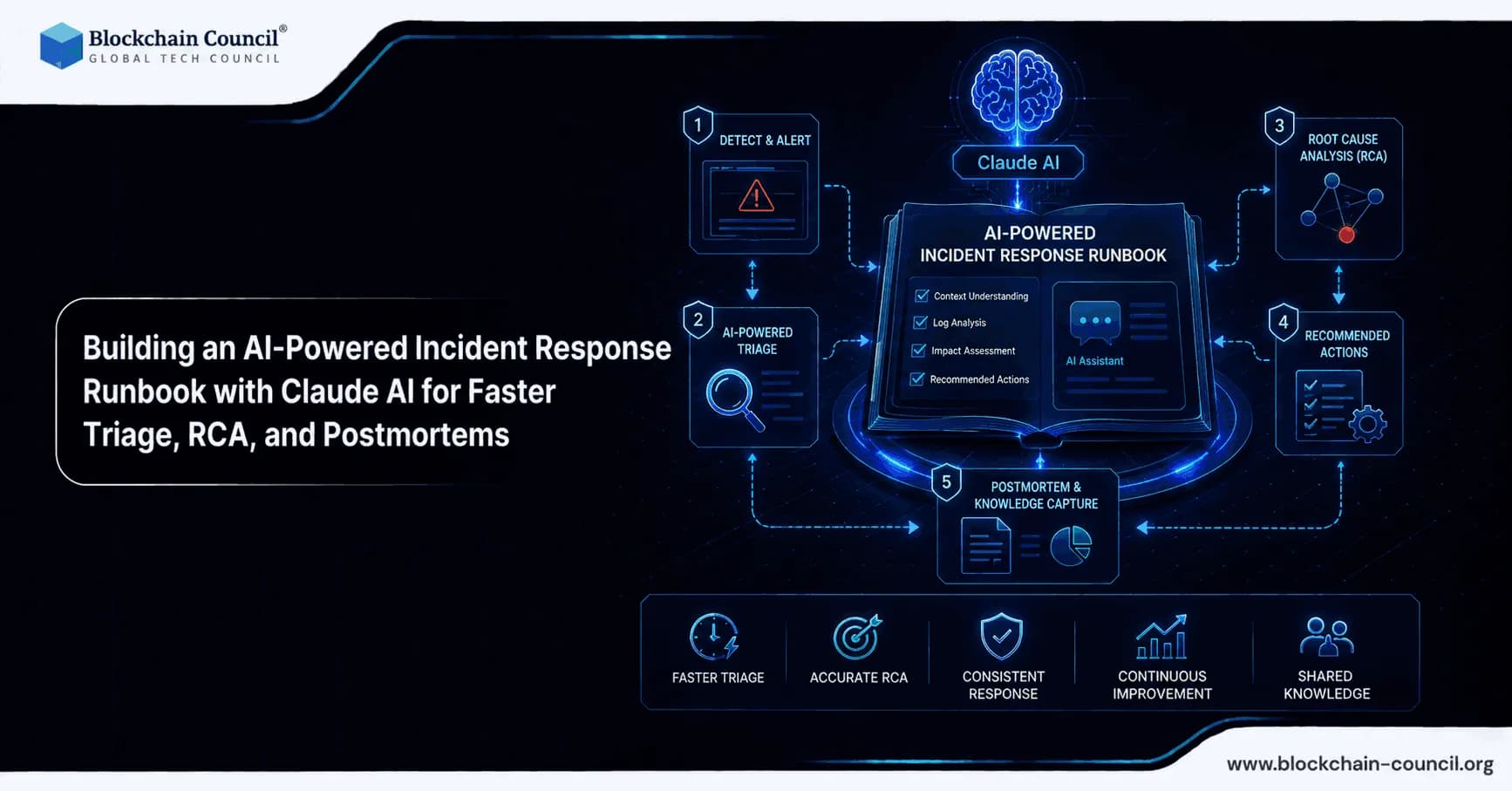
Building an AI-powered incident response runbook with Claude AI is becoming a practical approach to reducing alert fatigue, speeding up containment, and producing higher quality root cause analyses and postmortems. As production stacks grow more complex, and as AI features introduce non-deterministic behavior, engineering teams are dealing with more frequent and harder-to-debug incidents. Claude AI workflows increasingly rely on managed agents, modular Skills, and Model Context Protocol (MCP) integrations to deliver structured, context-aware incident handling. Build AI-powered incident response runbooks with Claude AI to automate triage, root cause analysis, alert summarization, and postmortem generation by gaining expertise through an AI certification, automating monitoring and response workflows using a Python certification, and improving operational efficiency with a Digital marketing course.
This guide explains how to design an AI incident response runbook that uses Claude AI to accelerate triage, root cause analysis (RCA), and postmortems while keeping humans in control of risky actions.

Why AI-Powered Incident Response Runbooks Matter
Traditional incident response runbooks are static documents that require a calm, experienced operator to execute correctly under pressure. AI-powered runbooks transform that documentation into an interactive workflow capable of reading logs, searching repositories, summarizing telemetry, proposing hypotheses, and drafting communications.
Several ecosystem developments make this feasible today:
Claude Managed Agents for SRE workflows that can be triggered by webhooks (PagerDuty and similar platforms) and operate with approval gates for sensitive actions.
Skills systems that attach team runbooks and conventions to relevant sessions for progressive disclosure - for example, requiring runbook consultation before any infrastructure changes.
MCP integration to connect Claude to tools and knowledge sources in a structured way, including logs, dashboards, ticketing systems, repositories, and status pages.
Contextual debugging support where tools like Claude Code can surface runbooks, known issues, and postmortems during active investigations.
Early results are promising. Manual triage often takes 30 to 60 minutes for initial isolation, while Claude-powered runbooks have enabled containment in under 5 minutes in some workflows through automated freeze or rollback suggestions. Teams also report fewer false positives in RCA when agents have runbook context and follow hypothesis-driven methods.
Core Design Principles for a Claude AI Incident Response Runbook
1) Optimize for Speed: Contain First, Diagnose Second
A practical AI incident response runbook should prioritize rapid stabilization. The guiding principle is to declare the incident early and refine the response as information becomes available, relying on structured checklists for isolation actions such as throttling, disabling features, freezing prompts, or rolling back a model version.
In runbook form, this typically translates to:
Declare incident and open a dedicated response channel.
Assign an Incident Commander to coordinate all activity.
Contain by disabling or limiting impact using feature flags, circuit breakers, or queue drains.
Diagnose using logs, metrics, traces, and recent deployment context.
Recover with verified fixes and regression monitoring in place.
2) Keep Humans in the Loop for Destructive Actions
Claude can accelerate investigation and propose actions, but destructive steps must require explicit human approval. Anthropic's managed agent patterns implement approval-gated tools - often as a requires_action step - for operations such as restarting services, modifying infrastructure, merging pull requests, or revoking credentials.
3) Make the Runbook Modular with Skills
Rather than maintaining one large document, use modular Skills aligned to specific incident types and systems, such as:
payments-high-latency
auth-outage
model-regression
ransomware-response
This approach improves retrieval accuracy and reduces the risk of Claude applying the wrong procedure under pressure.
4) Ground Outputs in Your Real Environment
Runbook quality depends directly on what Claude can access. Effective setups mount resources such as repositories, runbooks, and logs into the agent workspace, and use MCP to connect external systems. Without this grounding, the risk of generic advice and RCA hallucination increases substantially.
Reference Architecture: Claude AI Runbook from Alert to Postmortem
Below is a practical architecture that teams commonly converge on when building an AI-powered incident response runbook with Claude AI.
Step 1: Trigger the Incident Agent from Your Alerting System
Use a webhook from PagerDuty, Opsgenie, or an internal alert router. Include the following in the trigger payload:
Service name, environment, and severity
Primary alert signal (error rate, latency, or saturation)
Links to dashboards and logs
Recent deployments and configuration changes
Claude Managed Agents can then spin up an incident session automatically with the appropriate Skill attached.
Step 2: Run the First-Five-Minutes Containment Checklist
Codify a deterministic playbook for initial actions. For Claude-integrated products, real-world runbooks frequently include tactics such as:
Freeze prompt or policy changes to stop behavioral drift.
Rollback model version or routing configuration.
Disable a feature flag or isolate a faulty downstream dependency.
Throttle traffic, enable queueing, or degrade gracefully.
Claude should output a short containment plan, then request approval for any action that changes production state.
Step 3: Hypothesis-Driven Triage and RCA
Rather than producing a single guess, instruct Claude to generate multiple hypotheses and test each against available evidence. Bringing runbooks, repositories, and known issues into the debugging context allows the agent to check patterns such as connection pool exhaustion or recognized dependency failure modes.
A reliable structure for this step is:
Symptom summary: what is failing, where, and for whom.
Blast radius: affected user segments, regions, endpoints, and queues.
Candidate hypotheses ranked by likelihood.
Evidence checks: log queries, metrics comparisons, and error signatures.
Most likely cause with supporting data.
Next actions with associated risk and rollback plan.
Step 4: Fix Proposals and Safe Automation
In more advanced setups, Claude can propose a patch, open a pull request, and then wait for human approval before any changes are applied. This pattern is effective because it converts investigation into an auditable artifact - a diff with tests and assigned reviewers - rather than an improvised sequence of shell commands.
Recommended guardrails:
PR creation is permitted, but merging requires human approval.
All production changes must include a documented rollback plan.
Every action must be recorded with timestamps and the name of the approver.
Step 5: Communications and Status Updates Every 10 Minutes
Mature runbooks mandate periodic stakeholder updates. Targeting 10-minute update cycles during active incidents helps maintain organizational awareness and user trust. Claude can draft these updates using a consistent template that avoids speculation and clearly states what is known, what is being tested, and what users should expect.
Step 6: Post-Incident Postmortem Within 24 Hours
AI is particularly effective at producing postmortems because it can assemble timelines, summarize logs, and convert discussion notes into a structured document. A 24-hour postmortem turnaround is a reasonable target when Claude handles the assembly work.
Have Claude produce:
Executive summary covering impact, duration, and user effect.
Detection covering the signals, alerts, and how the issue was identified.
Timeline with key decisions and actions recorded chronologically.
Root cause and all contributing factors.
What went well and what requires improvement.
Action items with assigned owners and deadlines.
Practical Implementation Tips
Use Strict Output Formats to Reduce Ambiguity
Instruct Claude to respond in defined sections: Triage, Containment, Hypotheses, Evidence, Recommended Actions, and Approvals Needed. Consistent structure improves handoffs between team members and reduces errors during high-pressure situations.
Attach the Right Context Automatically
Skills should automatically include:
Service-level SLOs and error budget policy.
Runbooks and a known-issues list.
Links to dashboards and log search templates.
Recent change history including deployments, feature flags, and configuration updates.
Adopt Evidence-First Rules to Manage Hallucination Risk
Build the following rules directly into runbook instructions:
No root cause statement without evidence - a log line, metric shift, diff, or trace is required.
Label uncertainty explicitly when confidence is low.
Prefer reversible actions early in the response (rollback, disable, throttle).
Security and Compliance Considerations for AI Incident Response
Connecting a large language model to production data changes your threat model. To keep an AI-powered incident response runbook secure:
Least privilege: agent credentials should be scoped per service and environment.
Redaction: prevent secrets and personally identifiable information from entering prompts and logs.
Audit trails: record all prompts, tool calls, approvals, and outputs.
Separation of duties: approvals should be handled by the on-call lead or Incident Commander, not the person who initiated the action.
For teams building SecOps runbooks - such as ransomware response workflows - modular Skills and MCP-based workflows can standardize steps including containment, credential rotation, and forensic collection.
Training and Internal Readiness
Learn how to use Claude AI for incident management workflows including log analysis, RCA documentation, and automated escalation processes by mastering AI-driven operations through an AI certification, developing incident automation systems using a Node JS Course, and scaling enterprise automation strategies using an AI powered marketing course.
Conclusion
Building an AI-powered incident response runbook with Claude AI is less about replacing SRE judgment and more about compressing the slowest parts of incident work: collecting context, testing hypotheses, drafting stakeholder updates, and producing a complete postmortem. With Managed Agents, modular Skills, and MCP integrations, teams can move from reactive, document-heavy processes to interactive runbooks that contain issues faster, reduce RCA noise, and strengthen organizational learning.
The pattern that succeeds consistently is straightforward: automate the time-consuming and repetitive steps, require human approval for destructive actions, ground every conclusion in evidence, and keep postmortems fast, structured, and action-oriented.
FAQs
1. What is an AI-powered incident response runbook with Claude AI?
An AI-powered incident response runbook with Claude AI is an interactive workflow that helps teams triage, diagnose, contain, and document production incidents. It can read logs, summarize alerts, test hypotheses, and draft postmortems using approved tools and context. The goal is faster response while keeping humans responsible for risky decisions.
2. Why do teams need AI-powered incident response runbooks?
Teams need AI-powered runbooks because modern systems generate too many alerts, logs, and failure signals for manual review alone. Claude can help organize evidence, reduce triage time, and surface likely causes faster. This improves incident response without requiring humans to stare heroically at dashboards like exhausted lighthouse keepers.
3. How does Claude AI help with incident triage?
Claude AI helps triage by summarizing symptoms, checking logs, reviewing metrics, and identifying the affected services or users. It can rank possible causes and suggest the next evidence checks. This allows teams to move from confusion to containment more quickly.
4. What is the first priority in an AI incident runbook?
The first priority is containment, not perfect diagnosis. Teams should stabilize the system by throttling traffic, disabling risky features, rolling back changes, or isolating failing dependencies. Detailed root cause analysis can happen after the impact is reduced.
5. Why should humans stay in the loop during incidents?
Humans should approve destructive or production-changing actions because AI can still make incorrect assumptions. Actions such as restarting services, changing infrastructure, revoking credentials, or merging fixes should require explicit approval. Claude can recommend actions, but accountability belongs to the incident team.
6. What are Claude Skills in incident response?
Claude Skills are modular instructions and workflows attached to specific incident types or systems. Examples include skills for payment latency, authentication outages, model regressions, or ransomware response. They help Claude follow the correct procedure instead of improvising generic advice.
7. Why should incident runbooks be modular?
Modular runbooks are easier to maintain, retrieve, and apply during high-pressure incidents. A focused skill for a specific failure type is more accurate than one giant document covering everything. This reduces the chance of Claude using the wrong response pattern.
8. What is MCP’s role in AI incident response?
MCP, or Model Context Protocol, connects Claude to tools and knowledge sources in a structured way. It can link Claude to logs, repositories, dashboards, ticketing systems, and status pages. This gives Claude real operational context instead of vague guesses wearing a confident hat.
9. How should an incident agent be triggered?
An incident agent can be triggered through webhooks from tools such as PagerDuty, Opsgenie, or an internal alert router. The alert should include service name, environment, severity, dashboard links, logs, and recent changes. This gives Claude enough context to start triage immediately.
10. What should be included in the first-five-minutes checklist?
The checklist should include incident declaration, response channel creation, Incident Commander assignment, and initial containment options. It may also include rollback checks, feature flag review, traffic throttling, or queue draining. Claude should summarize the plan and ask for approval before changing production.
11. How does Claude support root cause analysis?
Claude supports root cause analysis by generating multiple hypotheses and testing them against available evidence. It can compare logs, metrics, traces, recent deployments, and known issues. A reliable RCA should include supporting data rather than a dramatic guess from the machine oracle.
12. What is hypothesis-driven triage?
Hypothesis-driven triage means listing possible causes, ranking them, and checking each one against evidence. Claude can organize this process by showing symptoms, blast radius, candidate causes, and verification steps. This reduces tunnel vision and improves investigation quality.
13. Can Claude AI propose fixes during incidents?
Yes, Claude can propose patches, configuration changes, rollback steps, or pull requests during incidents. However, the final action should be reviewed and approved by humans. This keeps fixes auditable and prevents rushed changes from creating a second incident, humanity’s favorite sequel.
14. Why are status updates important during incidents?
Status updates keep stakeholders informed about impact, progress, and expected next steps. Claude can draft updates every 10 minutes using a consistent template that avoids speculation. Clear communication reduces confusion while engineers focus on recovery.
15. How can Claude help with postmortems?
Claude can assemble timelines, summarize logs, extract decisions, and draft structured postmortems. It can include impact, duration, detection, root cause, contributing factors, and action items. This helps teams complete postmortems within 24 hours while details are still fresh.
16. What should a good incident postmortem include?
A good postmortem should include an executive summary, detection details, timeline, root cause, contributing factors, and lessons learned. It should also list action items with owners and deadlines. The purpose is improvement, not blame dressed up in corporate formatting.
17. How can teams reduce hallucination risk in AI incident response?
Teams can reduce hallucination risk by requiring evidence for every root cause claim. Claude should cite logs, metrics, traces, diffs, or dashboard signals before making conclusions. Low-confidence findings should be clearly labeled as uncertain.
18. What security controls are needed for AI incident runbooks?
AI incident runbooks need least-privilege access, data redaction, audit trails, and approval gates. Teams should record prompts, tool calls, outputs, and human approvals. Sensitive data such as secrets and personal information should not enter AI prompts unnecessarily.
19. How should teams prepare for AI-assisted incident response?
Teams should define standard procedures, create modular skills, connect trusted tools, and train responders on approval workflows. They should also test runbooks in simulated incidents before using them broadly. Practicing before production chaos arrives is apparently still legal and recommended.
20. What is the main benefit of using Claude AI for incident response?
The main benefit is faster, more structured incident handling across triage, containment, RCA, and postmortems. Claude can automate repetitive investigation work while humans control high-risk decisions. This helps teams reduce alert fatigue, improve response quality, and learn faster from failures.
Related Articles
View All
Claude Ai
Claude Sonnet 5 for Cybersecurity: Threat Detection, Incident Response, and Risk Analysis
Claude Sonnet 5 can support SOC teams with alert triage, incident timelines, and risk analysis when used with strong guardrails and human review.

Claude Ai
Claude Sonnet 5 for Developers: Building Smarter AI Agents and Enterprise Applications
Claude Sonnet 5 for Developers is a practical guide to building AI agents, coding workflows, and enterprise applications with Anthropic's latest Sonnet model.

Claude Ai
Claude Sonnet 5 in AI-Powered Crypto Trading: Opportunities, Risks, and Best Practices
Claude Sonnet 5 can support AI-powered crypto trading through research, monitoring, and strategy support, but execution needs strict controls.
Trending Articles
What is AWS? A Beginner's Guide to Cloud Computing
Everything you need to know about Amazon Web Services, cloud computing fundamentals, and career opportunities.
Claude AI Tools for Productivity
Discover Claude AI tools for productivity to streamline tasks, manage workflows, and improve efficiency.
Blockchain in Supply Chain Provenance Tracking
Supply chains are under pressure to prove not just efficiency, but also authenticity, sustainability, and fairness. Customers want to know if their coffee really is fair trade, if the diamonds are con