

How to Use Claude AI to Automate CI/CD Pipelines: Practical DevOps Workflows and Examples
 Suyash Raizada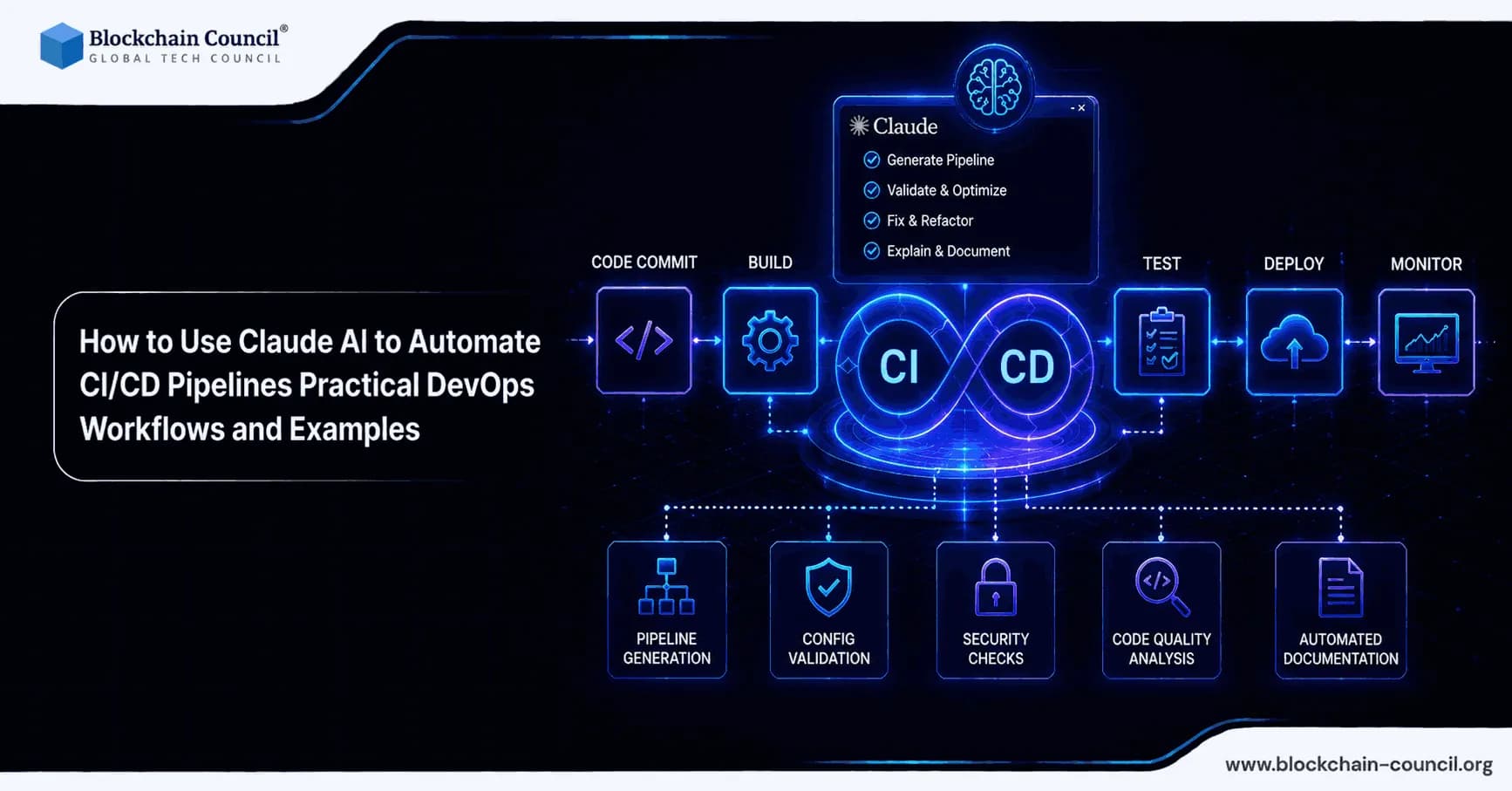
Using Claude AI to automate CI/CD pipelines is becoming a practical pattern for DevOps teams that want faster releases, fewer manual steps, and more consistent delivery. Rather than relying on AI only for chat-based assistance, many teams now run Claude as an event-driven pipeline worker in GitLab CI/CD, GitHub Actions, or Jenkins, where it can review merge requests, generate or fix YAML, implement small code changes, and open merge requests with proposed updates. Automate CI/CD pipelines using Claude AI for code reviews, deployment validation, workflow generation, and DevOps optimization by building expertise through an AI certification, scripting automation workflows using a Python certification, and scaling modern DevOps practices with a Digital marketing course.
This article explains how to integrate Claude into CI/CD pipelines using deterministic prompts, permission controls, and job isolation. You will find practical workflow examples, including a working GitLab CI job pattern you can adapt for production use.

Use Claude AI to Automate CI/CD Pipelines
AI adoption in DevOps is increasingly tied to measurable outcomes. Industry data suggests that organizations using AI in DevOps workflows often see 20-50% faster deployment cycles, with AI-driven automation reducing manual intervention and improving early error detection. Claude Code documentation also reports high success rates for automated merge request creation in real production workflows.
In day-to-day engineering terms, Claude can contribute to CI/CD by:
Turning failing pipelines into actionable fixes - reading logs, proposing changes, and opening a merge request.
Automating repetitive platform work - YAML scaffolding, secret wiring, and RBAC troubleshooting.
Improving review throughput with automated code review notes, refactors, and documentation updates.
Reducing deployment risk through Blue-Green and Canary strategies with automated checks and rollback recommendations.
Core Concept: From Interactive Assistant to Deterministic Pipeline Worker
To use Claude reliably in CI/CD, treat the model as a controlled job runner rather than a free-form chatbot. Tooling such as Claude Code - a CLI built for coding workflows - supports patterns that make AI behavior more predictable in CI environments:
Event-driven triggers: run on merge request events, scheduled jobs, manual web triggers, or inline comments like @claude.
Permission modes: use explicit flags (for example, a mode that allows edits) to prevent uncontrolled write actions.
Tool allowlists: limit what Claude can do to specific tools such as Bash, Read, Edit, Write, and designated MCP servers for repository interactions.
Isolated execution: run AI tasks inside a dedicated CI job container for auditability and reproducibility.
Provider abstraction: route calls through the Anthropic API, Amazon Bedrock, or Google Vertex AI depending on enterprise requirements.
Security and Governance Checklist Before You Automate
Claude operating in CI/CD touches code, secrets, and production pathways. Before enabling write access, implement these controls:
Secrets management: store API keys in your CI secret store (GitLab CI/CD variables, GitHub Actions secrets, Vault, or cloud secret managers). Never print them in logs.
Least privilege: use fine-grained tokens for repository access and restrict the AI job to only the repositories and scopes it requires.
Network egress policy: where your environment supports it, restrict outbound network access for the AI job image.
Prompt hardening: treat prompts as code. Define what Claude can change, how to name branches, and which files are off-limits.
Human approval gates: retain human approvals for production deployments, particularly for high-risk changes. Start with AI-generated merge requests that engineers review before merging.
Teams formalizing AI governance for engineering will find that these practices align closely with structured training in AI, cybersecurity, and DevOps foundations - areas covered in depth by Blockchain Council certification programmes.
Workflow 1: GitLab CI/CD Merge Request Automation with Claude Code
This pattern serves as a practical baseline when you want Claude to review a merge request, implement fixes, and push changes as commits. The job below runs when the pipeline is triggered by a web action or a merge request event.
Example .gitlab-ci.yml Job
Note: configure ANTHROPIC_API_KEY (or your provider credentials) as a masked CI variable before using this job.
stages:
- ai

claude:
  stage: ai
  image: node:24-alpine3.21
  rules:
    - if: '$CI_PIPELINE_SOURCE == "web"'
    - if: '$CI_PIPELINE_SOURCE == "merge_request_event"'
  variables:
    GIT_STRATEGY: fetch
  before_script:
    - apk update
    - apk add --no-cache git curl bash
    - curl -fsSL https://claude.ai/install.sh | bash
  script:
    - /bin/gitlab-mcp-server || true
    - claude -p "${AI_FLOW_INPUT:-'Review this MR and implement changes'}" \
      --permission-mode acceptEdits \
      --allowedTools "Bash Read Edit Write mcp__gitlab" \
      --debug
Applying This Pattern in Real DevOps Workflows
Autofix failing tests: set AI_FLOW_INPUT to include the failing job logs and instruct Claude to implement the minimal fix and update affected tests.
Automated refactors: request safe refactors such as lint fixes, dependency bumps, or configuration normalization.
Merge request review assistant: ask for a structured review covering risks, edge cases, security considerations, and performance impacts.
To keep results consistent, make the prompt specific. For example:
Read the last pipeline logs. Identify the root cause of the failure. Change only files under /src and /tests. Do not modify lockfiles. Add one test that reproduces the bug. Commit with message 'Fix: <short summary>'.
Workflow 2: GitHub Actions for Container Build and Azure Deployment
A common use case is having Claude generate and iterate on GitHub Actions workflows for building Docker images and deploying to Azure services such as Azure Container Registry and Azure Container Instances.
Typical AI-Assisted Tasks in This Workflow
Scaffold workflow YAML for build, test, and push steps.
Wire secrets safely using GitHub Secrets and Azure Key Vault patterns.
Debug RBAC issues when service principals lack permissions to push images or deploy resources.
Optimize Docker builds by improving layer caching, multi-stage builds, and base image selection.
A reliable approach is to run Claude in a pull request workflow that proposes changes to workflow files and deployment scripts, then require human approval before merging. This preserves auditability and reduces the risk of unintended changes reaching production.
Workflow 3: Full CI/CD Automation with Testing, Deployment Strategies, and Monitoring
Once the basic agent pattern is working, teams typically expand into an end-to-end pipeline where Claude contributes across three phases: test, deploy, and observe.
1. Testing Automation: Matrix Runs and Intelligent Reporting
Matrix testing: Claude can generate matrix configurations covering OS versions, language runtimes, and dependency sets, and explain the tradeoffs of each.
Failure triage: summarize which tests failed, correlate failures with recent changes, and propose next actions.
Flaky test handling: recommend retry strategies, quarantine rules, or deterministic fixes for unreliable tests.
2. Deployment Automation: Blue-Green and Canary Releases
Blue-Green: deploy to a parallel environment, run health checks, and switch traffic when the new environment is stable.
Canary: roll out to a small percentage of traffic, monitor error rates and latency, then expand the rollout incrementally.
Automated rollback guidance: when monitoring thresholds are breached, Claude can recommend rollback steps and open an incident summary merge request for team follow-up.
3. Post-Deployment Monitoring: Performance and Regressions
Log and metric summarization: convert noisy log output into a concise incident narrative.
Bottleneck detection: identify slow endpoints, expensive queries, and container resource constraints.
Documentation generation: produce postmortem drafts, runbooks, and operational checklists from incident data.
For organizations building structured capability across CI/CD, security, and cloud operations, Blockchain Council certification paths in DevOps, cybersecurity, cloud security, and AI provide engineering teams with standardized practices that support reliable automation at scale.
Prompt Patterns That Improve Reliability in CI/CD
Prompt engineering is what determines whether Claude behaves like a dependable pipeline worker. The following patterns improve consistency.
Define an Explicit Task Contract
Inputs: merge request diff, failing job logs, target environment, and constraints.
Outputs: files to change, tests to add, exact commands to run, and commit message format.
Constraints: prohibited folders, no secret printing, no dependency changes unless explicitly requested.
Require Verification Steps
Instruct Claude to run tests or linters via allowed tools and include the output summary in the merge request description.
Require a short risk analysis covering backward compatibility, security impact, and performance impact.
Keep Changes Small and Reviewable
Prefer one issue per merge request.
Enforce a maximum number of files changed unless the job is explicitly a refactor run.
Common Pitfalls and How to Avoid Them
Over-broad permissions: avoid granting write tool access everywhere by default. Start with read-only review jobs and graduate to controlled edits once the pattern is validated.
Key leakage: prevent environment variable echoing and disable verbose logging unless actively debugging.
Non-deterministic behavior: keep prompts specific, pin tool versions, and avoid ambiguous success criteria.
Unexpected cost scaling: use caching, trigger AI jobs only on meaningful events, and apply filters (for example, only for merge requests carrying a specific label).
Conclusion: A Practical Approach to CI/CD Automation with Claude
Claude AI in CI/CD pipelines is most effective when implemented as an event-driven, permission-controlled pipeline worker. Start with a GitLab or GitHub workflow that produces AI-assisted merge requests for fixes and improvements, then expand toward testing matrices, safer deployment strategies (Blue-Green or Canary), and post-deployment monitoring summaries. With strong governance around secrets management, least privilege, and prompt contracts, Claude can measurably reduce manual pipeline work and help engineering teams ship more reliably. Learn how Claude AI can streamline CI/CD workflows with automated testing, deployment recommendations, and infrastructure troubleshooting by mastering AI-powered DevOps through an AI certification, building deployment automation systems using a Node JS Course, and promoting scalable engineering solutions using an AI powered marketing course.
FAQs
1. What does it mean to automate CI/CD pipelines with Claude AI?
Automating CI/CD pipelines with Claude AI means using Claude as a controlled pipeline worker inside tools like GitLab CI/CD, GitHub Actions, or Jenkins. It can review code, inspect logs, suggest fixes, update YAML files, and open merge requests. The goal is faster delivery with fewer manual steps and better consistency.
2. Why should DevOps teams use Claude AI in CI/CD?
DevOps teams can use Claude AI to reduce repetitive work, speed up troubleshooting, and improve pipeline reliability. Claude can analyze failed jobs, recommend fixes, and help generate deployment workflows. This saves engineers from manually decoding endless logs, one of computing’s less charming rituals.
3. How does Claude help with failing pipelines?
Claude can read failed pipeline logs, identify the likely root cause, and suggest a minimal fix. It can also update affected files and create a merge request for review. This makes pipeline failures easier to resolve without turning every build error into a group therapy session.
4. What is Claude Code in CI/CD automation?
Claude Code is a CLI-based coding tool that can run inside CI/CD jobs. It supports repository review, file edits, debugging, and merge request workflows. When used with strict permissions, it behaves more like a controlled automation worker than a free-form chatbot.
5. Why should Claude be treated as a deterministic pipeline worker?
Claude should be treated as a deterministic pipeline worker to keep behavior predictable, auditable, and safe. Teams should define clear prompts, allowed tools, file limits, and expected outputs. Otherwise, AI automation can become a very expensive way to create mysterious pull requests.
6. What CI/CD platforms can Claude work with?
Claude can be used with GitLab CI/CD, GitHub Actions, Jenkins, and other pipeline systems that support scripted jobs. It can run as part of merge request events, scheduled jobs, web triggers, or comment-based commands. The exact setup depends on the team’s infrastructure and security requirements.
7. How can Claude automate GitLab merge requests?
Claude can run inside a GitLab CI job to review a merge request, inspect changes, and implement requested fixes. It can push commits or create proposed updates when permission settings allow edits. Human reviewers should still approve the final merge.
8. How can Claude help with GitHub Actions?
Claude can generate, review, and troubleshoot GitHub Actions workflow files. It can help with Docker builds, Azure deployment steps, secret wiring, caching, and RBAC-related errors. This is useful because YAML failures remain one of humanity’s most avoidable sources of suffering.
9. What permissions should Claude have in CI/CD?
Claude should start with read-only access and only receive edit permissions after the workflow is validated. Tool allowlists should limit actions to approved capabilities such as reading, editing, writing, or repository-specific MCP tools. Production deployments should still require human approval.
10. Why is secrets management important when using Claude in CI/CD?
Secrets management is critical because CI/CD systems often handle API keys, deployment tokens, and cloud credentials. These values should be stored in secure secret stores and never printed in logs. Claude should be restricted from exposing or modifying sensitive credentials.
11. What is least privilege in AI-powered CI/CD?
Least privilege means Claude should only access the repositories, files, tools, and actions required for its task. This reduces the damage if the AI job behaves incorrectly or is misconfigured. It is basic security hygiene, which software teams occasionally rediscover after incidents.
12. What are tool allowlists in Claude CI/CD workflows?
Tool allowlists define which tools Claude is allowed to use during a pipeline job. For example, teams may allow Bash, Read, Edit, Write, and selected MCP tools while blocking unsafe commands. This makes AI behavior easier to control and audit.
13. How can Claude support automated code reviews?
Claude can review merge requests for bugs, security risks, edge cases, performance issues, and maintainability concerns. It can produce structured comments and suggest improvements directly in the review workflow. Developers still need to verify the recommendations before merging.
14. How can Claude improve deployment strategies?
Claude can help design and review Blue-Green and Canary deployment workflows. It can recommend health checks, rollback steps, and monitoring thresholds. These strategies reduce release risk by testing changes gradually instead of flinging them into production and hoping for civilization.
15. How does Claude assist with testing automation?
Claude can generate test matrices, summarize failed tests, identify flaky tests, and recommend fixes. It can also suggest which runtimes, operating systems, or dependency versions should be included in CI testing. This improves coverage and makes failures easier to understand.
16. What prompt patterns improve Claude’s reliability in CI/CD?
Reliable prompts should define inputs, outputs, constraints, files that can be changed, and verification steps. They should also specify commit message format, test commands, and risk analysis requirements. Clear prompts reduce ambiguity and make results easier to review.
17. Why should Claude’s changes be small and reviewable?
Small changes are easier to test, understand, and approve. Teams should limit Claude to one issue per merge request whenever possible. Large AI-generated changes can hide errors, because apparently debugging one giant automated refactor is how engineers earn character.
18. What are common risks of using Claude in CI/CD?
Common risks include over-broad permissions, secret leakage, non-deterministic outputs, unexpected costs, and unsafe changes. These risks can be reduced with prompt hardening, approval gates, logging controls, and scoped triggers. AI should improve pipelines, not become an incident.
19. How can teams control Claude AI costs in CI/CD?
Teams can control costs by triggering Claude only on meaningful events, using labels or manual triggers, caching repeated context, and keeping prompts concise. They should also monitor usage across workflows and repositories. Cost tracking matters because automated helpfulness still sends a bill.
20. What is the best way to start using Claude for CI/CD automation?
The best way to start is with read-only review jobs that summarize risks and suggest fixes. After validation, teams can allow Claude to create merge requests for small, low-risk changes. Production deployments should remain protected by human approval, testing, and security controls.
Related Articles
View All
Claude Ai
Claude in CI/CD: Securing Agentic Pipelines
Explore the Claude Code GitHub Action case and learn how developers can secure CI/CD pipelines against prompt injection, secret leakage, and agentic risks.

Claude Ai
How to Use Claude Fable 5.1 for Free
Find out whether Claude Fable 5.1 is available for free, which Claude plans provide access, and what users need to know before trying Anthropic’s latest AI model.

Claude Ai
Fable 5 for Image and Text Workflows: Multimodal AI Use Cases Explained
Learn how Fable 5 supports image and text workflows, from document extraction and dashboard analysis to agentic AI systems and enterprise governance.
Trending Articles
AWS Career Roadmap
A step-by-step guide to building a successful career in Amazon Web Services cloud computing.

Top 5 DeFi Platforms
Explore the leading decentralized finance platforms and what makes each one unique in the evolving DeFi landscape.
How Blockchain Secures AI Data
Understand how blockchain technology is being applied to protect the integrity and security of AI training data.