

Bad Prompt vs Good Prompt: How to Write Prompts That Actually Work
 Suyash Raizada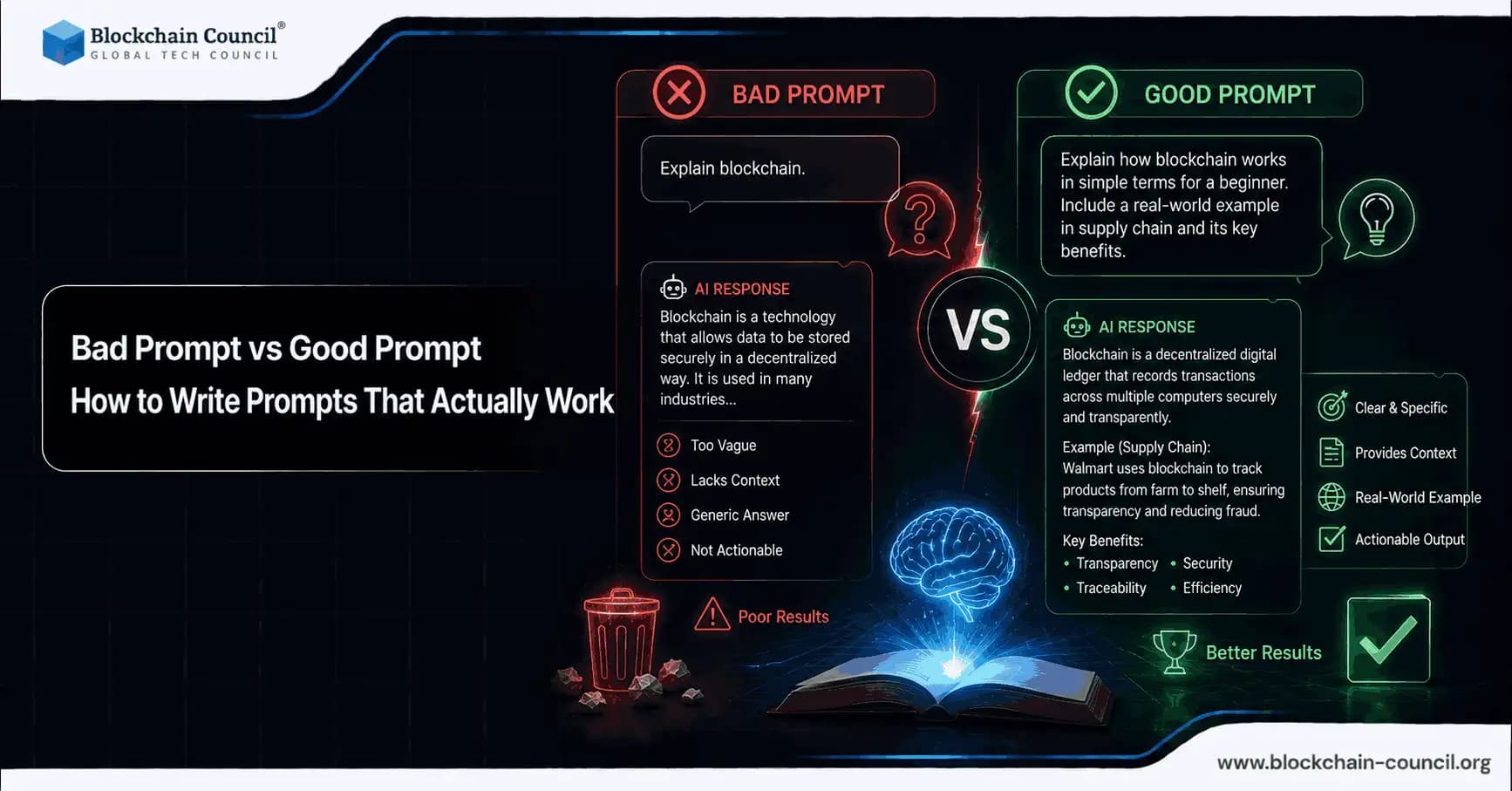
Prompts are the interface between you and large language models (LLMs) like ChatGPT, Claude, Gemini, Grok, and coding assistants such as GitHub Copilot. The quality of your prompts largely determines whether you get a helpful, accurate result or a generic, incorrect, or hallucinated response. Even with stronger models that perform better in zero-shot settings, poor prompts still produce inconsistent outputs and higher error rates.
This guide explains what separates a bad prompt from a good prompt, why the distinction matters, and how to apply practical patterns across prompts for ChatGPT, Claude, Gemini, and more. Learn the difference between bad and good prompts by understanding clarity, context, instruction structure, and output optimization for AI systems by building expertise through an AI certification, testing prompt workflows and AI automation using a Python certification, and improving AI-driven business strategies with a Digital marketing course.

Why Prompts Matter More Than People Expect
Prompt engineering has shifted from a niche skill to a core professional competency. LinkedIn Economic Graph data shows prompt engineering job postings rose sharply between 2024 and 2025, reflecting sustained demand. Tooling has also matured: LangChain and PromptHub-style workflows now support automated prompt optimization, and modern models often require fewer examples to perform well.
Real-world deployments, however, keep running into the same bottleneck: unclear requirements. A Hugging Face report from early 2026 noted that a significant share of enterprise AI deployments fail initial tests due to suboptimal prompting. In practice, the model is rarely the only problem. The prompt is often the biggest controllable variable.
Bad Prompt vs Good Prompt: The Practical Difference
A bad prompt is not necessarily short. It is usually underspecified, ambiguous, or missing context. A good prompt is clear, structured, and constrained so the model can reliably align to your intent.
What Makes a Prompt "Bad"
Vague goal: "Write a summary" without specifying what kind of summary or for whom.
No context: Missing audience, domain, or the source material.
No constraints: No length, format, tone, or required elements.
Conflicting instructions: "Be detailed but keep it under 50 words."
Single-shot expectation: Treating the first output as final rather than iterating.
What Makes a Prompt "Good"
Specific task: What you want and what "done" looks like.
Relevant context: Audience, domain assumptions, and inputs such as text, data, or code.
Constraints: Word count, tone, style, format, and exclusions.
Role assignment: "Act as a senior data analyst" to set standards and viewpoint.
Verification: Ask for checks, tests, or a confidence assessment where appropriate.
These differences are measurable. Across common benchmarks, detailed prompts can substantially increase model performance. Research on Claude models has found that vague prompts lead to significantly more hallucinations. GitHub's own guidance shows developers get better Copilot results when using structured prompts instead of ad-hoc instructions.
A Simple Framework for Writing Better Prompts
For a reusable mental model, apply this five-part structure to any prompt:
Role: Who should the model act as?
Task: What should it produce?
Context: What background information or inputs does it need?
Constraints: Format, length, tone, scope, tools, and assumptions.
Quality bar: Criteria for success and how to validate the output.
AI educators and enterprise teams consistently recommend these elements. Developer-focused guidance emphasizes persona assignment, while Microsoft's Copilot documentation highlights that specifying format and actionability produces more useful outputs.
Bad Prompt vs Good Prompt Examples (ChatGPT, Claude, Gemini)
Example 1: Content Creation
Bad prompt: "Write a blog post."
Good prompt:
"You are a technical writer. Write an 800 to 1,000 word blog post for LLM prompt users explaining bad prompt vs good prompt. Use a professional tone. Include: (1) a definition section, (2) a table comparing characteristics, (3) three before-and-after prompt examples for ChatGPT and Claude, and (4) a checklist readers can reuse. Format with H2 and H3 headings and short paragraphs."
Why it works: It defines the audience, length, structure, and success criteria, which reduces generic filler and ambiguity.
Example 2: Code Debugging (Claude or ChatGPT)
Bad prompt: "Fix this code."
Good prompt:
"Act as a Python performance engineer. Debug and optimize the following recursive Fibonacci function that times out for n > 35. Constraints: keep the function signature the same, run under 1 second for n = 40, and include tests. Output: (1) corrected code, (2) explanation of changes, (3) time complexity comparison. Code: [paste code]."
Why it works: It states the problem, the performance target, the constraints, and the expected deliverables clearly.
Example 3: Data Analysis (Gemini or ChatGPT)
Bad prompt: "Analyze sales data."
Good prompt:
"You are a data analyst. Using the attached CSV for Q1 2026 sales, deliver: (1) top 3 revenue drivers, (2) top 3 risks or anomalies, (3) a short executive summary for non-technical stakeholders, and (4) Python code using pandas and matplotlib for two charts. If assumptions are needed, list them first."
Why it works: It defines outputs, audience, and how to handle missing or ambiguous information.
Model-Specific Prompting Tips
Different models respond better to different prompt styles. If you use multiple tools regularly, a lightweight playbook saves time and improves consistency.
Prompts for ChatGPT
Ask for step-by-step reasoning on complex tasks: This typically improves math and multi-step logic accuracy.
Specify the output format explicitly: For example, "Return JSON with keys: summary, risks, next_steps."
Use role and audience together: "Act as a compliance analyst writing for a CTO."
Prompts for Claude
Use structured sections: XML-style tags and clear section headers improve alignment and reasoning consistency.
Use few-shot examples when tone or formatting is strict: Claude benefits from seeing one ideal sample output.
Request explicit constraint handling: "If constraints conflict, ask a clarifying question before proceeding."
Prompts for Gemini and Multimodal Workflows
Be explicit about each input modality: "Use the image to extract fields, then use the text spec to validate."
Separate extraction from interpretation: First ask for what is observed, then ask for what it means.
Common Failure Patterns and How to Fix Them
Hallucinations from missing context: Provide source text or data, and ask the model to quote or reference specific parts of the input.
Overly broad scope: Narrow to one objective per prompt, or ask for an outline before full output.
Unverifiable claims: Ask the model to flag uncertainty, list assumptions, and note what would be needed to confirm.
Inconsistent style: Provide a style guide snippet or a short exemplar within the prompt.
Enterprise Considerations: Transparency and Governance
Prompt quality is not just a productivity issue. It is also a governance issue. Regulatory frameworks such as the EU AI Act increase expectations around transparency for high-risk AI systems, which can include documenting how prompts are constructed, tested, and monitored over time.
For enterprise teams, this typically leads to:
Standard prompt templates for recurring tasks
Prompt libraries with versioning and evaluation notes
Red-teaming prompts to test safety boundaries and failure modes
Building Prompt Engineering Skills
Master prompt engineering techniques that improve AI accuracy, reasoning, creativity, and task execution across content creation, coding, and automation workflows by gaining expertise through an AI certification, building AI-powered applications using a Node JS Course, and scaling AI content systems using an AI powered marketing course.
Conclusion: Treat Prompts Like Specifications
The difference between a bad prompt and a good prompt is the difference between hoping for a useful result and specifying one. Strong prompts communicate intent, context, constraints, and the quality bar, which measurably improves accuracy and reduces hallucinations across ChatGPT, Claude, Gemini, and other LLMs. As multimodal prompting and enterprise AI governance continue to mature, prompt engineering will increasingly resemble writing clear requirements and test cases.
Start small: add a role, define the audience, set constraints, and specify an output format. Then iterate. In prompt engineering, clarity is leverage.
FAQs
1. What is a prompt in AI?
A prompt is the instruction or input given to an AI model to generate a response. It tells the model what task to perform and how to perform it. Clear prompts usually produce more accurate and useful outputs.
2. Why are prompts important in AI tools?
Prompts guide how AI models understand and complete tasks. Poor prompts can lead to vague or incorrect responses. Strong prompts improve accuracy, consistency, and overall output quality.
3. What makes a bad prompt?
A bad prompt is usually vague, unclear, or missing important context. It may not define the goal, format, or audience properly. This often causes generic or inaccurate AI responses.
4. What makes a good prompt?
A good prompt clearly explains the task, context, and expected output. It also includes constraints like tone, format, or word count. This helps AI models respond more effectively.
5. Why do vague prompts create poor results?
Vague prompts leave too much room for interpretation by the AI model. Without enough direction, the output may become irrelevant or inconsistent. Specific instructions reduce confusion and improve precision.
6. How does context improve prompts?
Context helps the AI understand the subject, audience, and purpose of the task. It provides background information needed for better responses. More relevant context usually leads to more accurate outputs.
7. Why should prompts include constraints?
Constraints define limits such as length, format, style, or exclusions. They help the AI stay focused and avoid unnecessary information. Clear constraints also improve consistency in responses.
8. What is role assignment in prompting?
Role assignment tells the AI to act as a specific professional or expert. Examples include asking it to behave like a data analyst or technical writer. This improves tone, depth, and response quality.
9. Why is output formatting important in prompts?
Specifying the format helps the AI organize information correctly. Users can request tables, bullet points, JSON, or structured sections. Proper formatting makes the output easier to use and understand.
10. What is prompt engineering?
Prompt engineering is the practice of designing prompts to improve AI performance. It focuses on clarity, structure, and task definition. This skill is becoming increasingly valuable in AI-related jobs.
11. How can prompts reduce AI hallucinations?
Detailed prompts provide the AI with clearer instructions and better context. Asking the model to reference sources or state assumptions also improves reliability. This reduces the chance of inaccurate information.
12. Why should prompts define the audience?
Defining the audience helps the AI choose the right tone and level of detail. A response for executives differs from one for developers or beginners. Audience clarity improves communication quality.
13. What is a common mistake in prompt writing?
One common mistake is asking for too many tasks in a single prompt. Broad or conflicting instructions can confuse the AI model. Breaking tasks into smaller steps usually works better.
14. Why is iteration important in prompting?
The first AI response is not always the best possible output. Iteration allows users to refine instructions and improve results gradually. Better prompts often come from testing and adjustment.
15. How do ChatGPT prompts differ from Claude prompts?
ChatGPT often performs well with direct instructions and step-by-step reasoning. Claude benefits from structured formatting and detailed examples. Different models respond better to different prompt styles.
16. What are multimodal prompts?
Multimodal prompts combine different input types such as text, images, or documents. They help AI systems process and connect multiple sources of information. This improves advanced workflow capabilities.
17. How can users improve code-related prompts?
Code prompts should clearly explain the problem, expected output, and constraints. Including the programming language and performance goals also helps. Structured prompts produce more accurate debugging and coding results.
18. Why should prompts request verification or checks?
Verification instructions encourage the AI to review its own output for mistakes. Users can ask for confidence levels, assumptions, or testing steps. This improves reliability and reduces errors.
19. How do enterprises use prompt templates?
Enterprises create standardized prompt templates for consistency and governance. These templates improve productivity across recurring AI tasks. They also support compliance and quality control efforts.
20. What is the main takeaway about good prompts?
Good prompts work like clear specifications for AI systems. They define the task, context, constraints, and expected output properly. Strong prompting improves accuracy, efficiency, and overall AI performance.
Related Articles
View All
AI & ML
Prompt Engineering to Context Engineering: How to Get Better Results From AI
Learn the journey from Prompt Engineering to Context Engineering. Understand prompts, few-shot and chain-of-thought techniques, context windows, memory, and RAG to get better results from AI.

AI & ML
How Does Jev AI Work?
Learn how Jev AI works, from its System One architecture and RLCD training method to typed outputs, calibrated probabilities, and fast decision-making for software automation.

AI & ML
Built to Catch AI Cheating: Rethinking Pre-Employment Assessments with HireValid
Explore how HireValid is rethinking pre-employment assessments with AI-resistant test design, integrity signals, candidate evidence, and human review to address AI-assisted cheating.
Trending Articles

Top 5 DeFi Platforms
Explore the leading decentralized finance platforms and what makes each one unique in the evolving DeFi landscape.
Claude AI Tools for Productivity
Discover Claude AI tools for productivity to streamline tasks, manage workflows, and improve efficiency.
How to Install Claude Code
Learn how to install Claude Code on macOS, Linux, and Windows using the native installer, plus verification, authentication, and troubleshooting tips.