

Google Announced Flow, The AI Filmmaking Suite for Creatives
 Michael Willson
Google has launched Flow — a new AI tool that helps creators make short, cinematic videos using just text or images. The tool brings together Google’s top AI models (Veo 3 for video, Imagen 4 for images, and Gemini for language) to make filmmaking faster, easier, and more creative. If you’ve ever wanted to make a video without filming or editing it yourself, Flow is built to do exactly that.
In this article, we’ll look at how Flow works, who it’s for, and how it compares to other video AI tools.

What Is Flow?
Flow is Google’s new video creation suite powered by AI. It lets you describe a scene or idea, and the AI builds a short film for you — complete with visuals, audio, transitions, and camera movement. It works inside Google’s AI ecosystem and supports creators across YouTube, social media, and marketing.
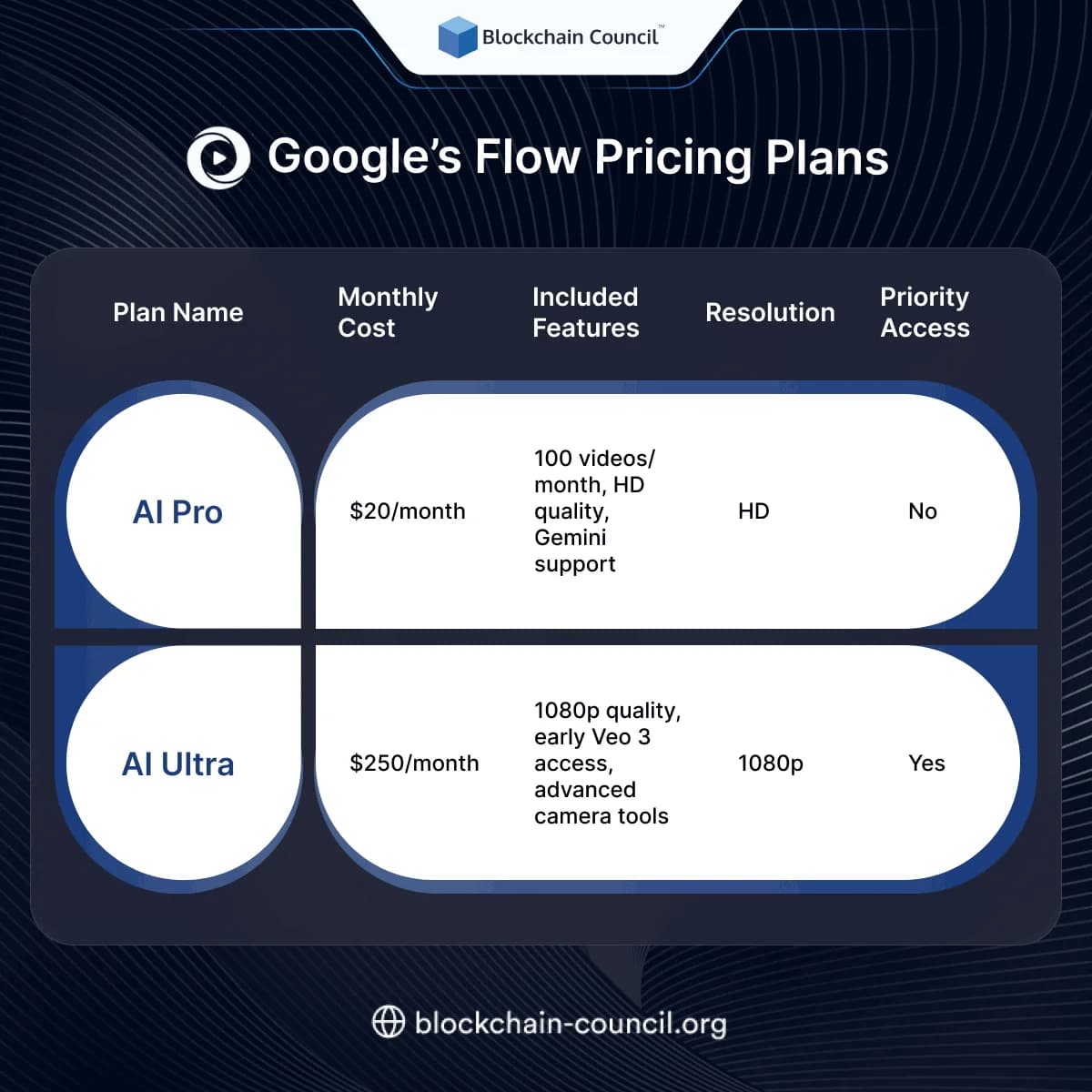
Right now, it’s available through Google’s AI Pro and AI Ultra plans.
How Flow Works
Uses Multiple AI Models
Flow uses:
- Veo 3 for generating video clips
- Imagen 4 for still visuals
- Gemini for understanding your prompts and building scenes
Together, these models help you go from idea to finished clip with very little effort.
Drag-and-Drop Scenes
You can arrange scenes, characters, and transitions using a visual layout. You don’t need to know editing or animation.
Built-In Sound
Flow also adds audio like music, effects, and even voice if you want it. It’s all handled by AI.
Flow vs Other AI Video Tools
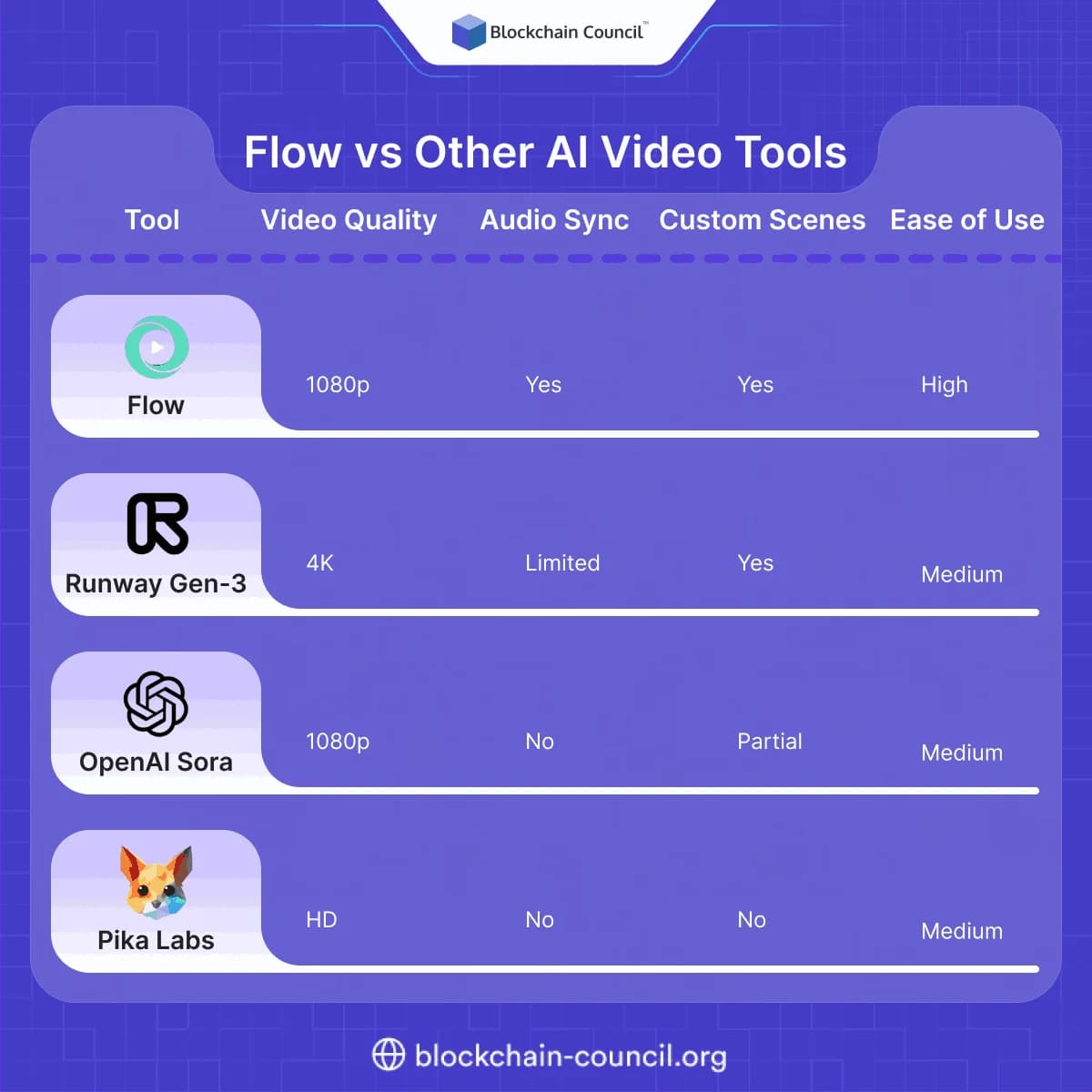
Flow is designed for simplicity — making it great for creators who want fast, flexible results.
Use Cases for Creators
Flow is useful for many types of creative work:
YouTube and Social Media
- Make fast, unique video content without recording
- Add visual flair to voiceovers or ideas
Education
- Turn concepts into animated lessons
- Use Flow to create visuals for classroom clips or explainers
Marketing
- Create product videos without filming
- Design video ads with custom branding and tone
Creators and marketers using Flow often explore the AI Certification to improve how they use tools like this. Others learn how to track and analyze video campaigns through a Data Science Certification, or learn brand storytelling with a Marketing and Business Certification.
Google’s Flow Pricing Plans
Why Flow Matters
AI tools are changing how videos are made. With Flow, you can skip filming, editing, and production — and still get high-quality results. Whether you’re a solo creator or a big team, Flow saves time and opens up new creative possibilities.
It’s not just about speeding up video work — it’s about making it possible for more people to tell stories with visuals, even if they don’t know how to shoot or edit.
Final Thoughts
Flow is a big step for AI filmmaking. It brings together some of Google’s best models into a tool that works for everyday creators, not just professionals. With simple controls and smart features, it helps you go from script to screen in minutes.
Whether you’re building a YouTube channel, teaching online, or running a campaign — Flow gives you a new way to create.
Related Articles
View All
AI & ML
Google Launches Gemini 4 Argon: Features and Capabilities
Google has launched Gemini 4 Argon, its flagship AI model for coding, finance, law, cybersecurity and science. Learn its key features, availability, pricing and safety details.

AI & ML
Google Playground: Create AI Games Without Coding
Learn what Google Playground is, how it uses generative AI to turn text prompts into browser games, how to create your first game, what it costs, how it compares with other no-code tools, and what limits to expect.

AI & ML
Can Gemini Improve Itself? Google AI and Recursive Self-Improvement Explained
Can Gemini improve itself? Learn why Google AI does not self-rewrite its model today, but can power controlled recursive self-improvement loops.
Trending Articles
The Role of Blockchain in Ethical AI Development
How blockchain technology is being used to promote transparency and accountability in artificial intelligence systems.
What is AWS? A Beginner's Guide to Cloud Computing
Everything you need to know about Amazon Web Services, cloud computing fundamentals, and career opportunities.

Can DeFi 2.0 Bridge the Gap Between Traditional and Decentralized Finance?
The next generation of DeFi protocols aims to connect traditional banking with decentralized finance ecosystems.