

ChatGPT Codex, OpenAI’s First Cloud Software Engineering Agent
 Michael Willson
ChatGPT Codex is OpenAI’s new cloud-based software engineering (SWE) agent that helps you write, debug, test, and manage code faster than ever. It can run code in the cloud, work with GitHub repos, and fix bugs on its own. If you’re a developer or part of a team building apps, Codex can save hours of manual work every week.
In this article, you’ll learn what ChatGPT Codex is, how it works, what makes it different from tools like GitHub Copilot or Devin, and how you can start using it today.

What is ChatGPT Codex?
ChatGPT Codex is an AI software engineer built by OpenAI. It’s available inside ChatGPT for Pro, Team, and Enterprise users. Codex helps automate software development tasks like:
- Writing and editing code
- Fixing bugs
- Running unit tests
- Making pull requests
- Managing code in real time
It works entirely in the cloud. That means it runs your code, checks results, and gives updates—all without needing to install anything on your machine.
Key Features of ChatGPT Codex
1. Cloud-based execution
Codex spins up a secure cloud workspace for each task. It can install dependencies, run code, and even test it in real time.
2. GitHub integration
It connects with GitHub repos, so it can pull the latest code, make changes, push updates, or create PRs automatically.
3. Multi-step task handling
Codex doesn’t just answer a coding question. It can handle long tasks end-to-end—like finding a bug, fixing it, testing the fix, and reporting the result.
4. Natural language control
You don’t need to write perfect prompts. You can just say, “Fix the bug in login.js” or “Add a forgot password feature”—and Codex figures it out.
How ChatGPT Codex Works
When you ask Codex to fix or build something, it does a few things behind the scenes:
- It creates a cloud environment (virtual workspace)
- It pulls your repo (if connected)
- It performs the task (bug fix, feature, test)
- It gives you a summary of what changed, including code diffs and test results
This all happens live. You can watch the steps as they run, and even stop or modify them mid-way.
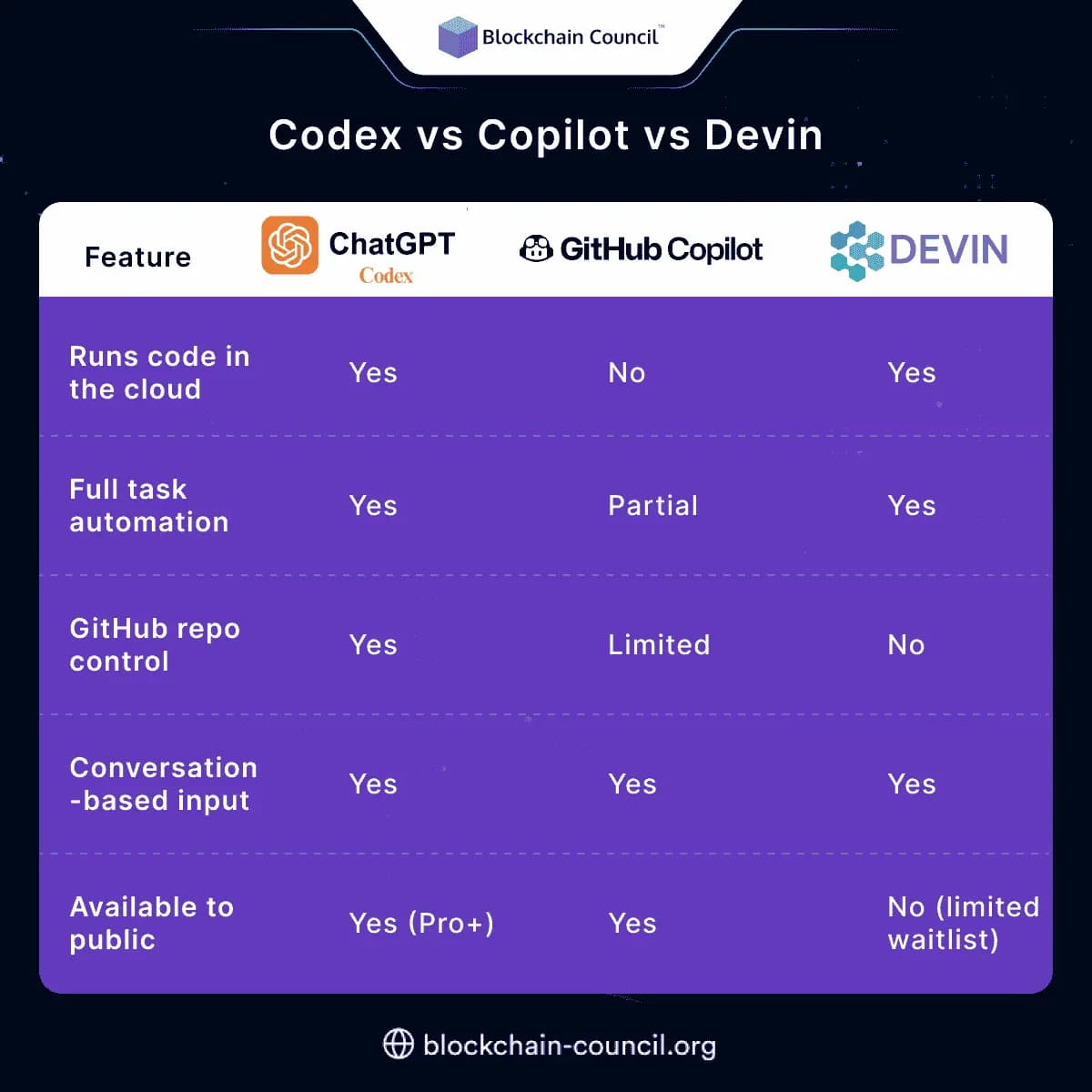
Codex vs Copilot vs Devin
Here’s how Codex compares to GitHub Copilot and Devin:
Real Use Cases of ChatGPT Codex
Bug fixing
Ask Codex to “Fix the error in payment.js” and it will scan the file, identify the issue, run the fix, test it, and show the results.
Code reviews
Codex can look through your pull requests and suggest changes or optimizations, using best practices and logic.
Feature creation
You can say “Add a dark mode toggle” or “Build a new settings page” and it’ll generate the required files, update components, and test them.
Test generation
Codex can create test files for your React components, API routes, or backend functions—then run them until they pass.
Why Developers Are Excited
- Saves hours of repetitive work
- Reduces human error in testing and debugging
- Great for solo developers or small teams
- Makes onboarding new devs faster by documenting changes
Who Can Use ChatGPT Codex?
Codex is currently available for:
- ChatGPT Pro users
- ChatGPT Team accounts
- ChatGPT Enterprise clients
OpenAI has said it will expand availability to more plans soon, including ChatGPT Plus and education partners.
How to Access and Use It
- Open ChatGPT (Pro, Team, or Enterprise)
- Choose the “Codex” AI assistant from the list
- Link your GitHub repo if needed
- Start asking it to build, fix, test, or explain code
You can also upload files or paste code directly. Codex will remember context throughout the session.
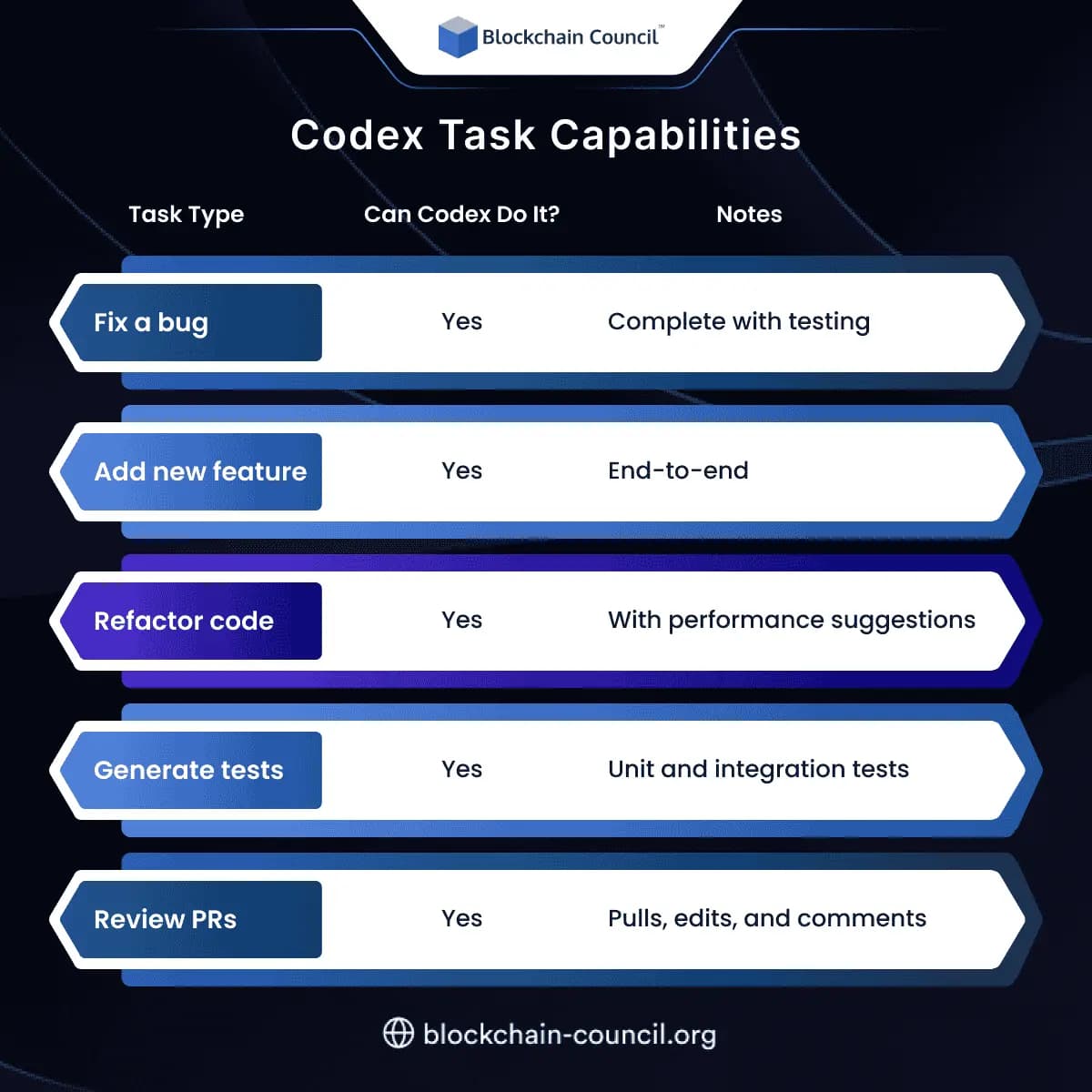
Codex Task Capabilities
Certifications to Boost Your Skills
To get the most from tools like Codex, it helps to understand how AI and data systems work behind the scenes. Here are three trusted certifications:
Final Thoughts
ChatGPT Codex isn’t just a coding assistant—it’s a full cloud-based AI engineer that can handle everything from bug fixing to repo management. It helps developers save time, stay consistent, and focus on bigger ideas.
Whether you’re a solo founder, startup dev, or part of a growing team, Codex is like having another engineer on call 24/7.
Related Articles
View All
AI & ML
Prompt Engineering to Context Engineering: How to Get Better Results From AI
Learn the journey from Prompt Engineering to Context Engineering. Understand prompts, few-shot and chain-of-thought techniques, context windows, memory, and RAG to get better results from AI.

AI & ML
Jev for Software Automation
Explore how Jev supports software automation with fast, typed, probabilistic decisions for routing, scoring, classification, verification, branching, and workflow control.

AI & ML
System One Models for Software
Explore how System One Models can be used in software to make fast, structured, probabilistic decisions for automation, routing, scoring, verification, and real-time applications.
Trending Articles
The Role of Blockchain in Ethical AI Development
How blockchain technology is being used to promote transparency and accountability in artificial intelligence systems.
How to Install Claude Code
Learn how to install Claude Code on macOS, Linux, and Windows using the native installer, plus verification, authentication, and troubleshooting tips.
Blockchain in Supply Chain Provenance Tracking
Supply chains are under pressure to prove not just efficiency, but also authenticity, sustainability, and fairness. Customers want to know if their coffee really is fair trade, if the diamonds are con