

The Best Proxies for Rank Tracking: A Technical Guide to Accurate, Geo-Specific SERP Data
 Michael Willson
Anyone who has tried to monitor keyword positions at scale runs into the same uncomfortable fact: the rankings you see in your own browser are rarely the rankings your audience sees. Search results are localized, personalized, and rate-limited, so the choice of proxies for rank tracking quietly decides whether your position reports are trustworthy or subtly wrong. This guide is written from the perspective of practitioners who have built and debugged tracking pipelines, and it focuses on what actually affects data quality rather than vendor marketing.
What follows walks through why rank tracking needs distributed IPs, how the main proxy types differ, the selection criteria that matter, a workflow you can copy, and the pitfalls that catch most teams. The aim is a setup that returns the same numbers a real user in a given city would see, day after day.

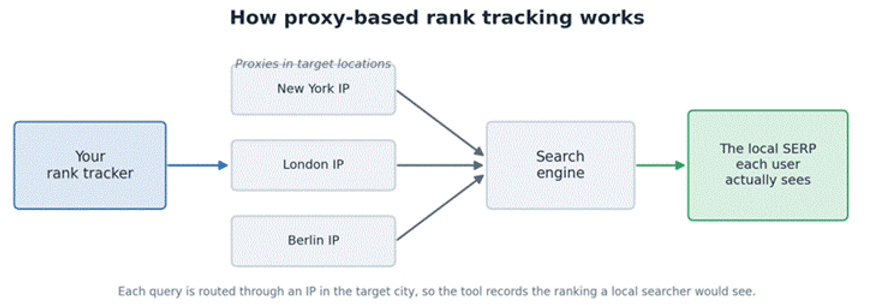
Figure 1. How a query reaches the right localized results.
Why rank tracking needs proxies
A single position check from your laptop is fine for one keyword you care about. It collapses the moment you need consistency, geography, or scale. Two forces are responsible: localization and volume.
The localization problem
Modern search engines tailor results to the searcher’s location, language, and device. The same query, say “emergency plumber,” can return a completely different top ten in Berlin than in Munich, and different again on mobile versus desktop. National-level checks miss this entirely. If your client is a regional chain, a ranking measured from a generic IP in another country tells you almost nothing about how customers in the target city actually see them.
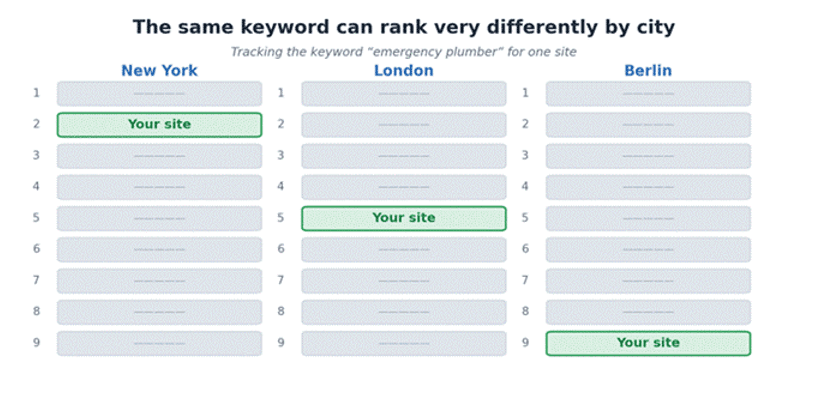
Figure 2. One keyword, one site - three different positions across cities.
Localization granularity varies by query. Navigational and informational terms like “what is schema markup” stay fairly stable across regions. Commercial and local-intent terms such as “dentist near me” or “buy running shoes” swing hard with geography. The practical rule is simple: the more local the intent, the more precisely your IP location needs to match the audience you’re reporting on, ideally down to the city rather than just the country.
The volume problem
Rank tracking multiplies fast. A modest agency might track 500 keywords across three cities, on two search engines, refreshed daily. That is already 500 × 3 × 2 = 3,000 queries per day, before you add mobile-versus-desktop splits or competitor domains. Run that from one IP and you will be throttled within minutes.
Here is the arithmetic most teams underestimate:
Tracking scope | Keywords | Locations | Engines | Daily refreshes | Queries/day |
Small site | 100 | 1 | 1 | 1 | 100 |
Local agency | 500 | 3 | 2 | 1 | 3,000 |
Multi-region brand | 2,000 | 8 | 2 | 1 | 32,000 |
Enterprise program | 10,000 | 15 | 3 | 2 | 900,000 |
At the higher end you are firing hundreds of thousands of requests, and no single address survives that. Distributing the load across many IPs is simply the only way to gather a complete, repeatable dataset without one address absorbing the entire query volume.
How search engines handle automated queries
To choose proxies well, it helps to understand what triggers throttling in the first place. Search engines lean on a few signals. The most direct is per-IP request rate: a single address sending dozens of structured queries per minute looks nothing like a human, and once it crosses a threshold the responses slow down and then a challenge page appears. They also read a behavioral fingerprint, where identical headers, missing cookies, perfectly even timing, and no human-like navigation all point to automation. Finally there is IP reputation, since addresses from heavily-used ranges, or IPs previously flagged for high query volume, start with less trust and reach limits sooner.
When a limit is hit, you do not simply get stopped. You often get degraded data instead: a CAPTCHA HTML page in place of results, or a truncated, regionally-defaulted SERP. That is the real risk for rank tracking. A pipeline that silently records “position not found” because it hit a challenge will quietly corrupt your trend lines. Spreading requests across a healthy pool of IPs keeps each address well under the rate that triggers these responses, so every check returns a clean, parseable results page. The goal is data integrity, not doing anything an engine prohibits.
The four proxy types compared
Most rank-tracking setups draw from four IP categories. They differ in cost, trust level, speed, and how precisely you can target a location.
Proxy type | Trust / acceptance | Speed | Geo granularity | Relative cost | Best for |
Datacenter IPv4 | Moderate | Very high | Country / city | Low | High-volume tracking of tolerant engines |
Residential | High | Medium | City-level | High | Strict engines, local-intent keywords |
Mobile | Highest | Medium-low | City / carrier | Highest | The hardest targets, mobile SERPs |
IPv6 | Low-moderate | Very high | Country | Very low | Bulk checks where IPv6 is accepted |
Figure 3. Cheaper IP types win on volume; pricier ones win on trust.
Datacenter proxies
These are IPs hosted in data centers: fast, cheap, and available in large quantities. For rank tracking they are the workhorse, because when an engine tolerates automated queries at a reasonable pace, datacenter IPv4 gives you the most checks per dollar. The catch is reputation. Since their ranges are identifiable, they are the first to be rate-limited under aggressive querying, so they reward careful pacing and a pool large enough that no single IP gets overworked.
Residential proxies
Residential IPs are assigned by ISPs to real households, so they carry the trust of ordinary user traffic. For local-intent keywords and strict engines, they are often the difference between accurate city-level data and a wall of challenge pages. They cost more and run a little slower than datacenter IPs, so the sensible pattern is to reserve them for the queries that genuinely need them rather than routing your entire keyword set through them.
Mobile proxies
Mobile proxies route through cellular networks (3G/4G/5G). Because carriers share a limited pool of addresses among many subscribers, these IPs are treated as the most human and are the hardest to rate-limit. They are also the priciest and not the fastest. For rank tracking, their niche is mobile SERPs in tough markets and the small set of queries where nothing cheaper returns clean results.
IPv4 vs IPv6, rotating vs static
Two more axes matter. On IPv4 versus IPv6, the IPv6 space is abundant and cheap, which is attractive at scale, but not every search property treats IPv6 traffic identically, so test acceptance before committing a large pipeline to it. On rotating versus static, rotating pools hand you a fresh IP per request or per time window, which spreads load automatically and suits high-volume scraping of results pages, while static IPs keep the same address for stability when you want consistent geo and predictable behavior. Many mature setups blend both, using rotating datacenter IPs for bulk checks and a few stable residential IPs for sensitive local terms.
Selection criteria that move the needle
Beyond type, a handful of properties separate a reliable provider from a frustrating one.
Geo coverage and granularity comes first: can you get IPs in the exact countries, and ideally cities, your keywords target? Country-only coverage breaks local rank tracking. IP reputation and freshness is next, because recycled IPs with a history of heavy querying reach limits faster, while clean, lightly-used addresses last longer between challenges. Pool size and subnet diversity matters more than raw count, since a thousand IPs spread across many subnets behave very differently from a thousand IPs in two adjacent ranges, and diversity is what keeps you under per-subnet limits. Throughput and latency is easy to forget until a daily run of 30,000 queries takes 18 hours and leaves no room for retries, so low latency and stable speed count as much as IP volume. Protocol support should match your tooling, with HTTP/HTTPS covering most scrapers and SOCKS5 useful for tools that need lower-level tunneling. Finally, rotation and session control lets you choose between per-request rotation and sticky sessions, so you can tune behavior per engine instead of accepting one setting for everything.
In practice, weighing these criteria is easier against a concrete catalog. A provider such as proxys.io, for example, lists datacenter, residential, and mobile IPv4 alongside IPv6 across markets like the United States, the United Kingdom, Germany and Poland, with HTTP(S) and SOCKS support. That kind of spread is what lets you match IP type and location to the engine and market you are tracking, instead of forcing every keyword through a single pool.
A practical tracking workflow
Here is a sequence that has held up across projects of different sizes.
1. Define the keyword and location matrix. List every keyword, the engine or engines, the target locations (city-precise where intent is local), and the device. This matrix is your query budget.
2. Assign IP type per segment. Send tolerant engines, informational keywords, and broad geo to datacenter or IPv6. Send strict engines, local intent, and city-precise terms to residential. Send mobile SERPs in a hard market to mobile.
3. Set pacing per IP. As a starting rule of thumb, keep each address well below one request every 10 to 20 seconds for the strictest targets, and looser for tolerant ones. Pace, do not sprint.
4. Size the pool to the run. Divide total daily queries by a safe per-IP daily ceiling. If you send 30,000 queries and cap each IP at 300 per day, you need on the order of 100 IPs, with headroom for retries.
5. Rotate and randomize. Rotate IPs, vary user-agents and timing slightly, and honor realistic request intervals so the pattern does not look mechanical.
6. Validate every response. Detect challenge pages and empty SERPs explicitly and re-queue them on a different IP, rather than letting them be recorded as “not ranking.”
7. Store raw and parsed. Keep the raw results page alongside the parsed position. When numbers look off later, you can audit what the engine actually returned.
A compact settings reference:
Target profile | IP type | Per-IP pace | Rotation |
Tolerant engine, broad geo | Datacenter / IPv6 | Faster | Per-request |
Strict engine, local intent | Residential | Slower | Sticky session |
Mobile SERP, hard market | Mobile | Slowest | Sticky session |
Pitfalls and trade-offs
A few lessons usually arrive the hard way.
Over-rotation hurts consistency. It is tempting to rotate aggressively, but if a keyword is checked from a different city-IP each day, normal geo variance can masquerade as ranking movement. For trend accuracy, keep the location stable even while rotating the specific IP within it.
Cheap shared IPs are a false economy. Bargain pools shared among many users tend to carry baggage such as prior heavy use and poor reputation, and you inherit it. The savings evaporate the first time half your checks come back as challenges and you have to re-run them.
Geo mismatch is silent and dangerous. An IP advertised as “US” may geolocate inconsistently across databases, so the engine serves a SERP for the wrong locale. Spot-check that your tracked results match the intended market before trusting a new batch of IPs.
IPv6 is not a free lunch. It is cheap and plentiful, but acceptance varies between search properties. Pilot it on a slice of your keywords and compare against a known-good source before migrating a large pipeline.
Speed versus accuracy is a real dial. Datacenter and IPv6 maximize checks per dollar, while residential and mobile maximize trust. There is no universally best choice, only the right blend for a given keyword set, which is why mixing types beats committing to one.
Matching proxy type to scenario
If you want a quick decision aid, this maps common situations to a sensible default.
Scenario | Sensible default |
National, informational keywords, tolerant engine | Datacenter IPv4 (rotating) |
Bulk checks, cost-sensitive, IPv6 accepted | IPv6 |
City-level local-intent terms | Residential, sticky per location |
Strict engine that challenges quickly | Residential or mobile |
Mobile-first market, mobile SERP | Mobile |
Mixed enterprise program | Datacenter bulk plus residential for sensitive terms |
Budgeting and cost per check
The useful metric is not price per IP. It is cost per clean check. Estimate it by taking the proxy spend for a period and dividing by the number of successful, validated checks in that period, not by attempts. Re-runs from challenges and dead IPs are pure overhead, which is why a slightly pricier but cleaner pool often wins on cost per check.
The budgeting path itself is short. Start by calculating daily query volume from your matrix, then set a conservative per-IP daily ceiling for each engine and derive the pool size from those two numbers. Add roughly a quarter more capacity as headroom for retries and bad IPs. Finally, split the spend by type, putting the bulk on cheap datacenter or IPv6 addresses and reserving a smaller premium budget for the residential or mobile IPs that specific queries genuinely need. Teams that track this number tend to stop over-buying expensive IPs for keywords a datacenter pool would handle, and stop under-buying trust for the local terms that actually need it.
FAQ
Do I need residential proxies for all rank tracking?
No. Reserve residential IPs for strict engines and city-level local terms. For tolerant engines and broad informational keywords, datacenter or IPv6 addresses return the same positions far more cheaply.
How many proxies do I need for rank tracking?
Divide daily query volume by a safe per-IP ceiling, then add headroom. Roughly 30,000 checks at 300 per IP means about 100 IPs, plus spare capacity for retries.
Why do my tracked rankings differ from my browser?
Your browser uses your location, history, and logged-in profile. A clean tracking setup queries from a neutral IP in the target location, closer to what an average local user actually sees.
Rotating or static proxies for SERP tracking?
It depends on the keyword. Rotating pools suit high-volume bulk checks, while static IPs give stable geo for sensitive local terms. Most mature pipelines use both.
Related Articles
View All
Info
The Best Forex Robots of 2026: A Deep Technical Review of What Advanced Automated Trading Systems Are Delivering
In 2026, the best Forex robots are becoming modular systems that incorporate machine learning, dynamic grid logic and low-latency execution filters to traverse the complex market conditions. The advanced Expert Advisors (EAs) that operate on MT4 and MT5 platforms are prioritizing risk management through adaptive drawdown control, API compatibility and high-quality analysis of tick data.

Info
Domain Name Search and Registration: A Practical Guide and 50 Best Websites
Learn Domain Name Search and Registration with best practices, security tips, lifecycle stages, and a curated list of 50 best websites for registrars and tools.

Info
Best Crypto Exchanges for Beginners in 2026
Discover the best cryptocurrency exchanges for beginners in 2026. Compare trading fees, security, supported coins, user experience, and features to choose the right platform.
Trending Articles

Top 5 DeFi Platforms
Explore the leading decentralized finance platforms and what makes each one unique in the evolving DeFi landscape.
How Blockchain Secures AI Data
Understand how blockchain technology is being applied to protect the integrity and security of AI training data.
What is AWS? A Beginner's Guide to Cloud Computing
Everything you need to know about Amazon Web Services, cloud computing fundamentals, and career opportunities.