

Google Introduces ‘Try It On’, Try Clothes Before Buying with AI
 Michael Willson
Google has launched a new AI feature called ‘Try It On’ — a virtual try-on tool that lets you see how clothes would look on your own body before you buy them. Just upload a photo, pick an item, and the tool shows how it fits and drapes in real life. This makes shopping more personal and helps reduce the guesswork of buying clothes online.
In this article, you’ll learn how ‘Try It On’ works, who it’s for, how it compares to other tools, and why it’s a big deal for online shopping.

What Is Google’s ‘Try It On’?
‘Try It On’ is part of Google’s AI shopping features. It lets users upload a full-body photo and see clothing items placed realistically on that image. The tool simulates real fabric behavior, like how a shirt stretches or how a skirt flows, so you get a more natural and accurate preview.
This feature is now available in Google Search for U.S. users through Search Labs.
How It Works
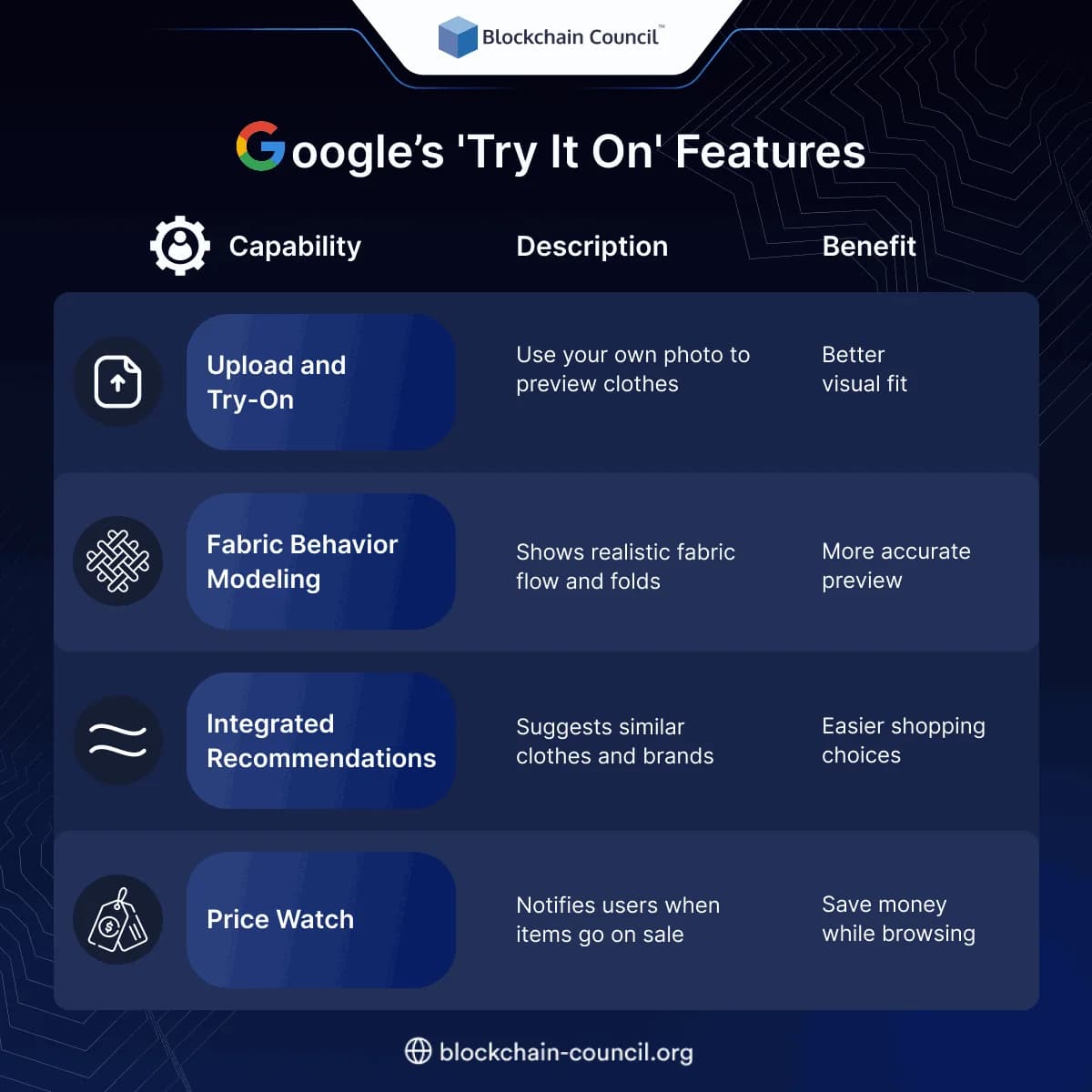
Upload Your Image
You upload a full-length image of yourself to the tool.
Choose a Clothing Item
Pick from supported products — currently limited to tops, pants, dresses, and jackets.
See the AI Fit Simulation
The AI shows you a realistic rendering of how that item would look on you, including folds, drapes, and fabric movement.
Get Shopping Recommendations
Based on your preferences, it suggests similar items, brands, or deals.
Benefits of ‘Try It On’
- Helps people visualize outfits before buying
- Reduces the number of returns
- Builds confidence in online shopping
- Offers price tracking for when items go on sale
Google ‘Try It On’ vs Other Virtual Try-On Tools
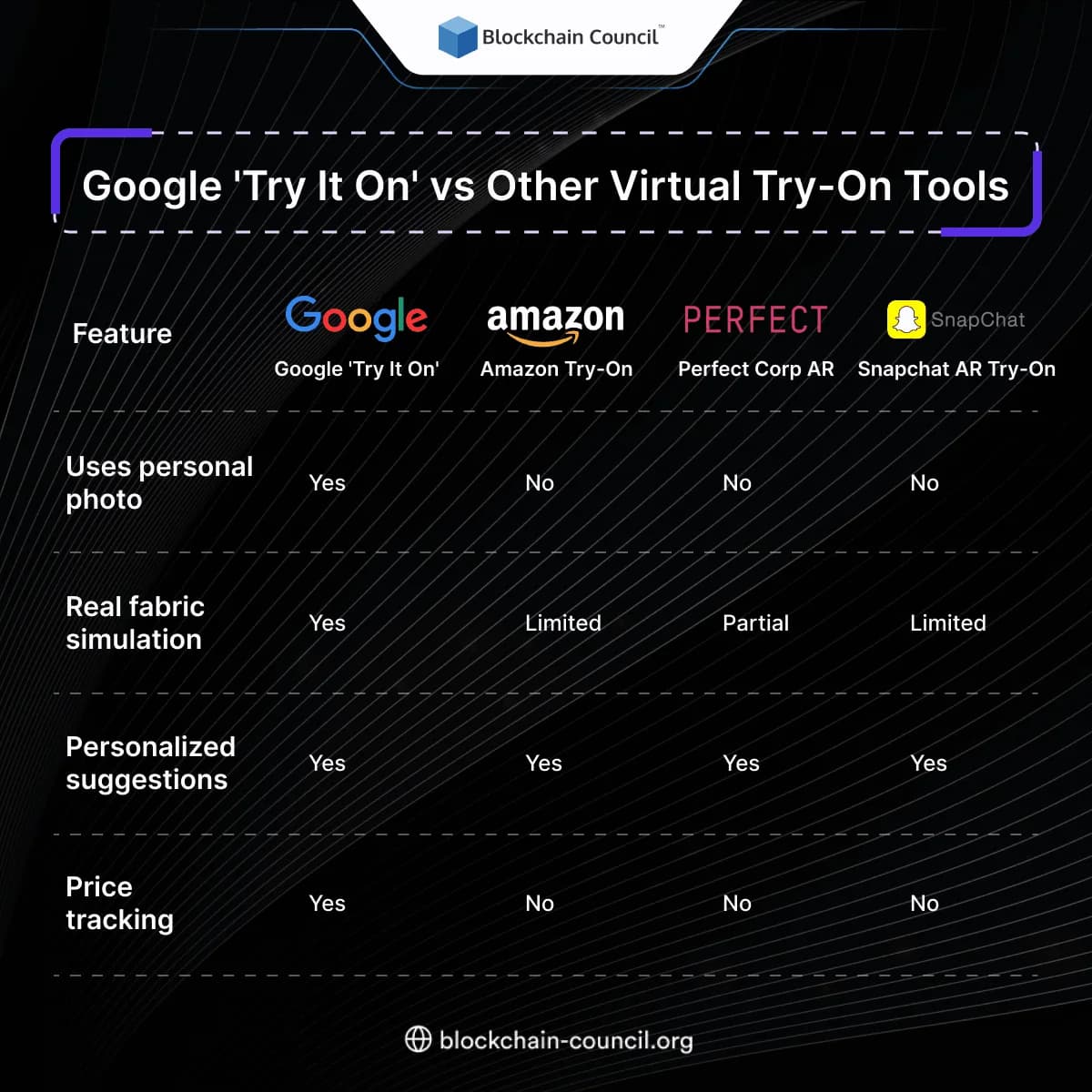
Google stands out by offering more realistic previews and price features — something competitors lack.
Who Should Use It?
Online Shoppers
Great for anyone who wants to see clothes on themselves before they buy.
Fashion Brands
Brands can partner with Google to show their products in a more immersive way.
Marketers and Retail Teams
It’s also useful for marketers building campaigns around AI-powered personalization.
People interested in using AI tools like this also explore learning paths like the AI Certification, or go further into user behavior with the Data Science Certification. For e-commerce and digital marketing, the Marketing and Business Certification helps tie AI to business outcomes.
Privacy and Safety Features
Google has included filters and rules to keep the tool safe:
- It blocks nudity and offensive content
- It does not allow photos of minors
- Images are processed securely
Google’s ‘Try It On’ Features
Final Thoughts
Google’s ‘Try It On’ feature is a smart upgrade for online shopping. It solves one of the biggest problems — not knowing how something will look on you. With its realistic AI previews, personalized tips, and price alerts, it gives buyers more confidence to shop online.
Whether you’re shopping for yourself or building tech to serve digital shoppers, ‘Try It On’ shows how AI can truly change how we browse and buy.
Related Articles
View All
AI & ML
YouTube Introduces Business Agents for YouTube Ads
YouTube is introducing Business Agent for ads, allowing shoppers to ask product questions, research purchases, and receive personalized guidance directly within YouTube ads.

AI & ML
Can Gemini Improve Itself? Google AI and Recursive Self-Improvement Explained
Can Gemini improve itself? Learn why Google AI does not self-rewrite its model today, but can power controlled recursive self-improvement loops.
AI & ML
Does Google AI Demonstrate Recursive Self Improvement?
Google uses AI to optimize parts of its model training stack, but public evidence does not show fully autonomous recursive self improvement.
Trending Articles
The Role of Blockchain in Ethical AI Development
How blockchain technology is being used to promote transparency and accountability in artificial intelligence systems.
How Blockchain Secures AI Data
Understand how blockchain technology is being applied to protect the integrity and security of AI training data.

Can DeFi 2.0 Bridge the Gap Between Traditional and Decentralized Finance?
The next generation of DeFi protocols aims to connect traditional banking with decentralized finance ecosystems.