Google Introduced Project Mariner, Prototype for Multi-Tasking AI Agents
 Michael Willson
Google has launched Project Mariner — a new AI agent that can handle multiple browser tasks at once. Unlike simple chatbots, Mariner is built to complete real online actions like filling forms, reading emails, or ordering groceries. The big idea? You tell it what to do, and it takes care of the steps — across tabs, pages, and platforms.
This article explains how Mariner works, what makes it different, how it compares to other AI agents, and why it matters to developers, teams, and everyday users.

What Is Project Mariner?
Project Mariner is a prototype AI agent from Google DeepMind. It can watch your screen, plan what to do, and take action — all inside your browser. You can ask it to handle things like searching the web, booking a ticket, or entering data. It doesn’t just give suggestions. It actually does the work.
Right now, it runs as a Chrome extension and powers features in the Gemini app and Google Search’s AI mode.
Key Features of Mariner
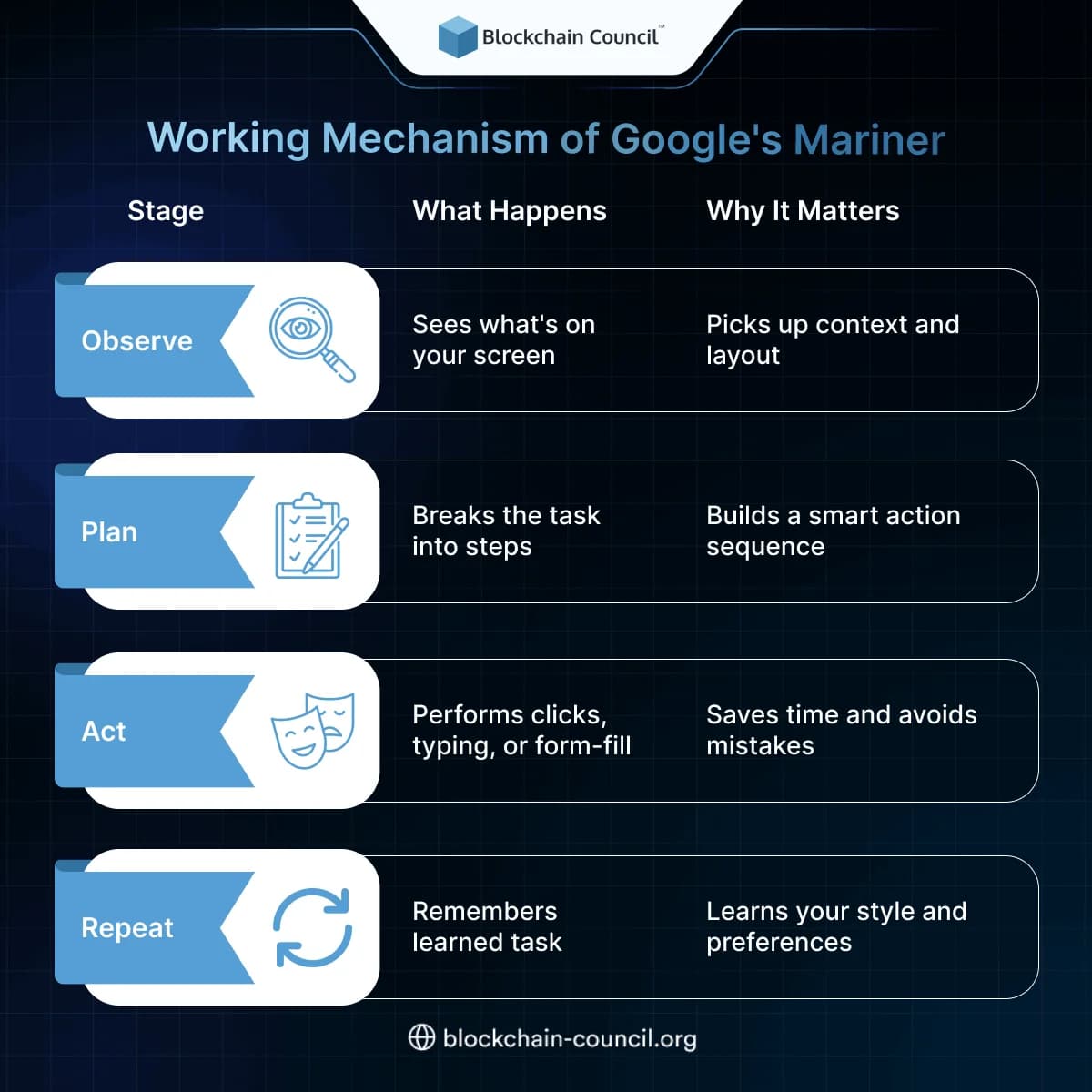
Observe, Plan, and Act
Mariner works by watching what’s on your screen. It then plans a step-by-step process and clicks, scrolls, or types to complete the task — like a digital assistant with a mouse and keyboard.
Teach and Repeat
You can show Mariner how to do something once, and it learns it. Next time, you just give a quick instruction, and it repeats the task on its own.
Handles Multiple Tasks
Mariner can work on up to 10 browser tasks at the same time. Think of it like running 10 interns in the background.
Gemini 2.0 Integration
It’s powered by Gemini’s latest model — so it understands not just text but also layout, visuals, and even page context.
Project Mariner vs Other AI Agents
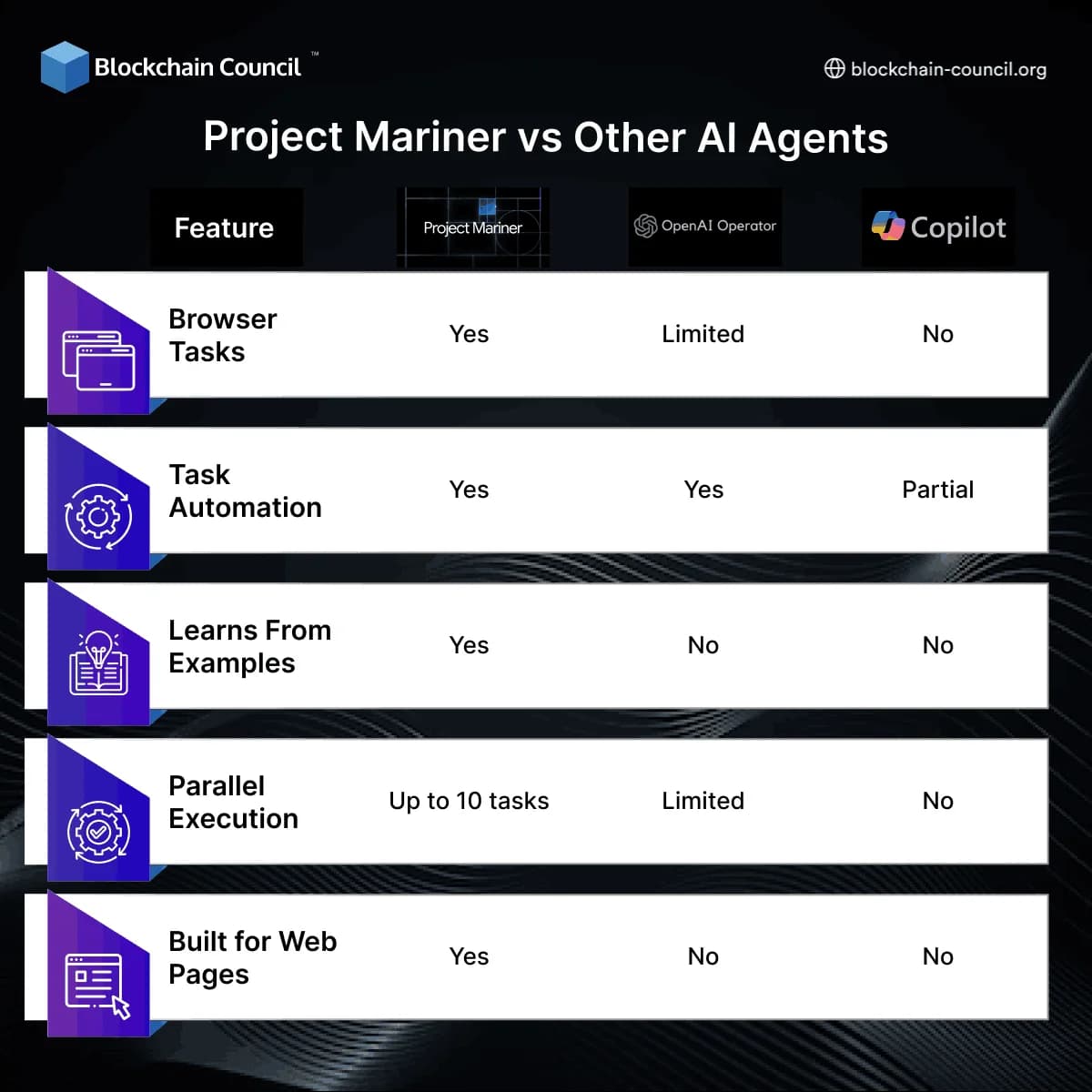
Mariner’s biggest strength is its hands-on ability to interact with real websites and apps — not just answer questions.
Where It Can Help
For Professionals
- Manage emails and schedules
- Fill forms or update dashboards
- Book meetings or research options
For Teams
- Automate onboarding steps
- Update tools or databases
- Handle customer info across sites
For Creators and Freelancers
- Fill out forms for content uploads
- Track and respond to web comments
- Handle outreach tasks with less manual work
Project Mariner also opens up new use cases for anyone learning or working with AI. Creators and developers often study systems like this through the AI Certification. Those managing tasks and tools can explore the Marketing and Business Certification for workflow automation. And data-driven teams often benefit from a Data Science Certification to track outcomes.
How Google’s Mariner Works
Why It Matters Now
Many AI tools answer questions — but Mariner takes action. That’s the big difference. Instead of copying answers or switching tabs, it just gets the job done.
If you’ve ever wished a virtual assistant could just “do the boring stuff,” Mariner is built for that. And because it can learn from your actions and repeat them later, it becomes smarter the more you use it.
Final Thoughts
Project Mariner is Google’s move toward hands-on AI — agents that don’t just chat, but actually work for you. It combines observation, smart planning, and web actions into one tool.
Whether you’re a solo creator, part of a team, or just someone who wants to save time on digital tasks — Mariner might soon be your favorite tab.