
OpenAI’s Guide to Choosing the Right AI Model for Every Task
 Blockchain Council
OpenAI has published a simple but powerful guide to help users decide which of its AI models to use for different jobs. The guide clearly explains what each model is good at, how often you can use it, and what kind of input it supports.
If you’ve ever been confused about which model to pick—whether it’s GPT-4o, GPT-4.5, or any of the o-series—this guide makes the decision easy.

What This Guide Helps You Do
The goal is to help people stop guessing. Instead of using GPT-4 for everything, OpenAI now gives direct instructions on when to use which model. This saves time, cuts costs, and helps teams get better results.
Models Explained One by One
Each model serves a different purpose. Some are fast, others are deep. Some write, some solve problems. Here’s what to use, when.
GPT-4o – For Everyday Use
GPT-4o is the all-rounder. It works for most daily tasks. It’s fast, supports files, images, audio, and video, and doesn’t have usage limits.
Use GPT-4o when you need to:
- Summarize notes from meetings
- Reply to emails quickly
- Brainstorm ideas with screenshots or audio
- Generate quick social captions or basic drafts
Prompt examples:
- “Turn this transcript into action points.”
- “Write a polite thank-you email to a client.”
- “Summarize this PDF in 3 bullet points.”
GPT-4.5 – For Creative and Emotional Tasks
This model is ideal for content that needs emotion, tone, or creativity. It’s smart about how people feel and what sounds natural.
Use GPT-4.5 when you want to:
- Write LinkedIn or Instagram posts
- Draft launch announcements
- Create customer messages with empathy
Prompt examples:
- “Write a product update post that feels warm and human.”
- “Craft an apology email for a delayed shipment.”
- “Help me draft a birthday message for a client.”
o4-mini – For Quick Technical Answers
o4-mini is fast and low-cost. It’s great for short tasks, especially in code, science, or math.
Use it for:
- Solving math problems
- Reviewing code snippets
- Giving quick summaries of docs
Prompt examples:
- “Fix this TypeScript error: [paste code]”
- “What is Newton’s second law in simple terms?”
- “Summarize the key findings in this one-page PDF.”
o4-mini-high – For Detailed Technical Work
This version is slower but more accurate. It’s best for longer or deeper tech problems.
Use o4-mini-high when you need to:
- Explain a scientific concept
- Generate SQL queries or formulas
- Walk through code logic step by step
Prompt examples:
- “Explain the difference between outer join and inner join.”
- “Write SQL to filter revenue above $10,000 grouped by quarter.”
- “Walk me through this Python function line by line.”
o3 – For Complex, Strategic Work
This model handles multi-step logic. It’s good at tying many ideas together—especially in analysis or planning.
Use o3 when you want to:
- Build business plans
- Review data pipelines
- Make forecasts with context
Prompt examples:
- “Analyze this CSV and suggest 3 cost-saving ideas.”
- “Build a quarterly marketing strategy using the last 12 months of data.”
- “Write a risk analysis based on this case study.”
o1-pro – For Deep Research and Reports
This legacy model is best for serious research or policy-level writing. It’s slow, but sharp.
Use o1-pro when:
- You need a multi-page research memo
- You’re writing detailed legal or policy documents
- Your task needs deep reasoning and accuracy
Prompt examples:
- “Create a 3-page summary on data localization laws in Europe.”
- “Write a financial analysis using theoretical models.”
- “Draft a privacy policy compliant with GDPR and CCPA.”
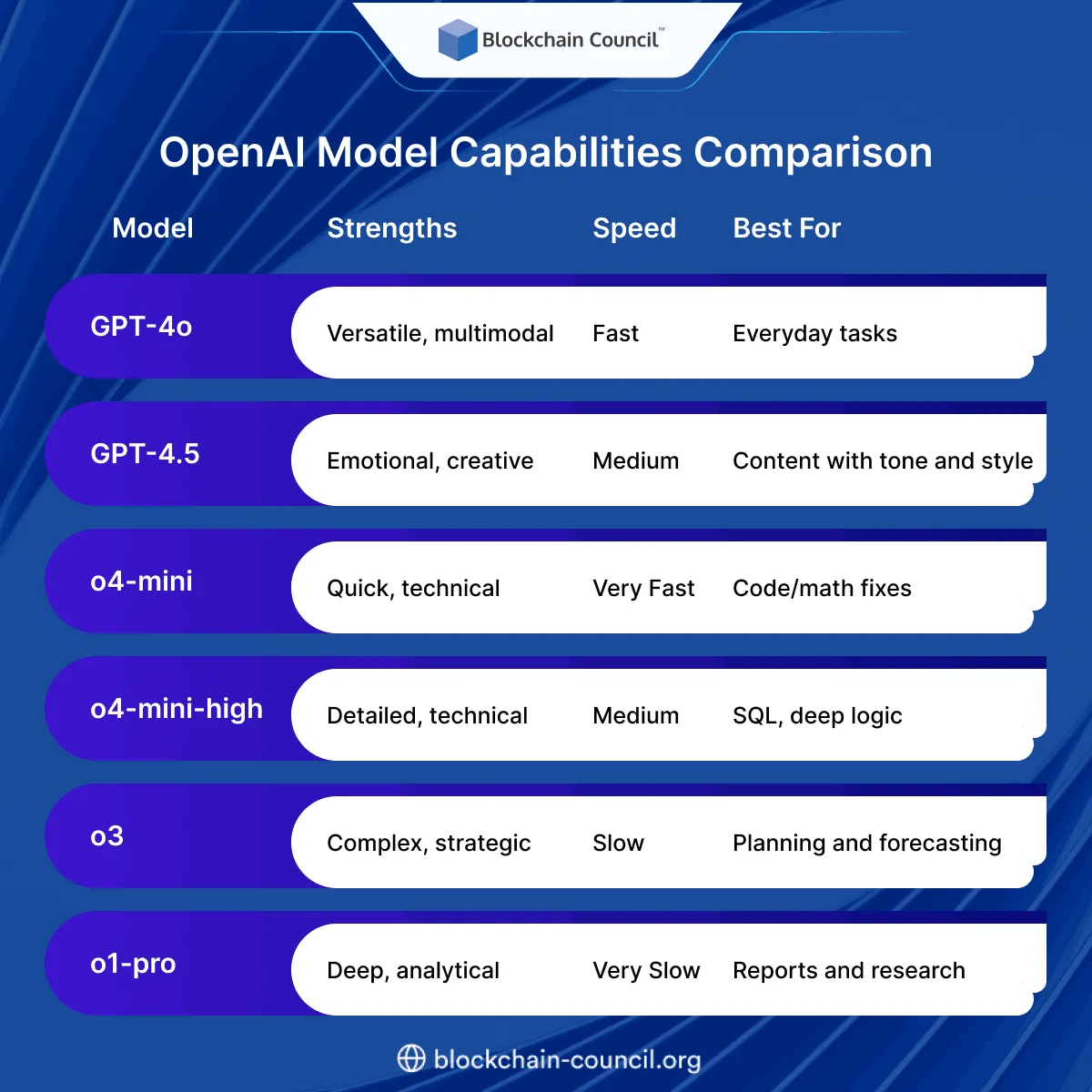
OpenAI Model Capabilities Comparison
Why This Guide Is a Game-Changer
Before this, many teams defaulted to using just one model for everything—usually GPT-4. That wasn’t cost-effective. It also didn’t always give the best results.
This guide from OpenAI helps everyone—from solo users to large teams—get more value from each model. It simplifies decision-making and lets users match tools to tasks.
Whether you’re writing copy, solving equations, building business plans, or debugging code, there’s now a clear answer to “which model should I use?”
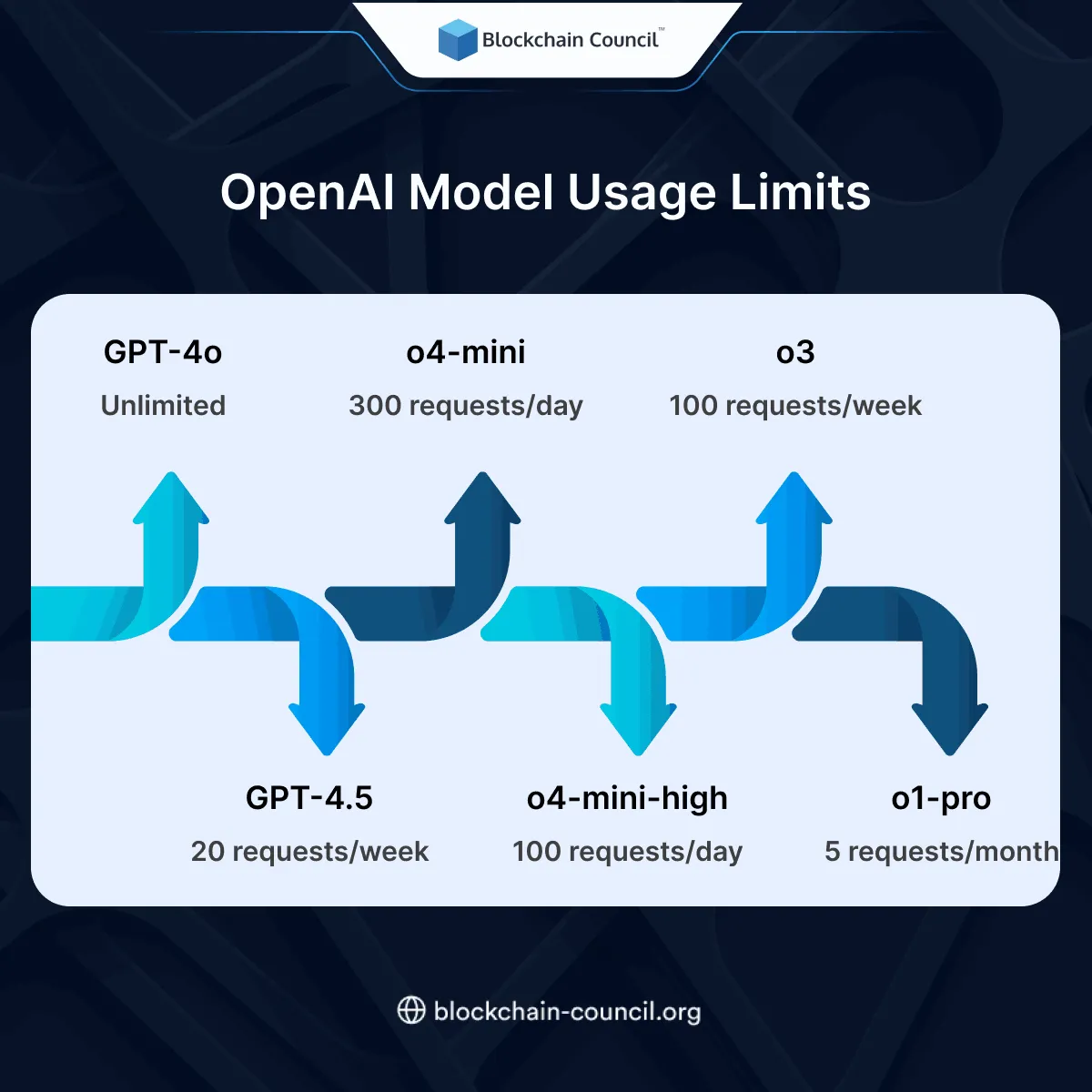
OpenAI Model Usage Limits
Final Thoughts
OpenAI’s guide clears the confusion around choosing the right model. It shows that there’s no one-size-fits-all. The best results come from using the right model at the right time.
If you want to build a career or business using these models, start with an AI Certification. If you’re more into data, the Data Science Certification is a great fit. And for business-focused professionals, the Marketing and Business Certification helps apply AI to real-world outcomes.
Related Articles
View All
AI & ML
NemoClaw Deployment Guide: Cloud, RTX PCs, Edge & Data Centers
Learn how to deploy NemoClaw across environments.

AI & ML
What Is OpenClaw? Complete Guide to the Open-Source AI Agent Platform (2026)
OpenClaw is an open-source AI agent platform that lets you automate tasks, run workflows, and control systems locally with powerful integrations.

AI & ML
What is AWS? A Beginner’s Guide to Cloud Computing and Career Opportunities
Cloud computing has become the backbone of modern technology. From streaming services and online shopping platforms to AI applications and mobile apps, most digital services today run on cloud infrastructure. One of the most powerful platforms leading this transformation is Amazon Web Services…
Trending Articles

The Role of Blockchain in Ethical AI Development
How blockchain technology is being used to promote transparency and accountability in artificial intelligence systems.

AWS Career Roadmap
A step-by-step guide to building a successful career in Amazon Web Services cloud computing.

Top 5 DeFi Platforms
Explore the leading decentralized finance platforms and what makes each one unique in the evolving DeFi landscape.