OpenAI Agent Builder
 Michael Willson
OpenAI has officially launched Agent Builder, a visual development platform that lets users create custom AI agents without deep coding. Announced at OpenAI Dev Day 2025, held in San Francisco on October 6, CEO Sam Altman introduced Agent Builder as part of the company’s new AgentKit suite. Experts covering the launch confirmed that it transforms AI from a “chatbot” into a “doer.”
This new system works hand-in-hand with GPT-5, OpenAI’s latest large-language model released in August 2025. The integration allows developers to design multi-step reasoning agents that can plan, act, and collaborate with humans in real time.

Professionals who want to understand how such agentic systems function can start with an AI certification to build a solid foundation in modern AI design and deployment.
What Is OpenAI Agent Builder?
Agent Builder is OpenAI’s drag-and-drop platform for building, testing, and deploying AI agents. It enables teams to visually connect models, data sources, APIs, and safety rules — all without writing heavy backend code.
Industry analysts describe it as a “workflow studio for reasoning AI”, allowing creators to map out every decision an agent makes. Agent Builder is part of AgentKit, which also includes ChatKit (for embedding chat interfaces) and a Connector Registry (for linking external tools).
Those looking to specialize in such integrated AI ecosystems can explore AI certs that focus on multimodal model orchestration and enterprise AI architecture.
How Does OpenAI Agent Builder Work?
The platform operates on a modular, node-based canvas. Each node represents a model (like GPT-5), tool, or logic block. Developers connect these nodes to define how an agent behaves, what tools it can access, and how it handles memory or user prompts.
Experts who tested preview versions observed several capabilities:
- Visual workflow editor for drag-and-drop logic
- Integrated safety guardrails and evaluation tools
- Memory management for contextual understanding
- Support for version control and rollback
- Deployment directly via OpenAI’s API or embedded ChatKit
To gain mastery over orchestrating multi-agent environments, professionals can upskill with an Agentic AI certification, which covers design, safety, and coordination principles for autonomous systems.
Key Features of OpenAI Agent Builder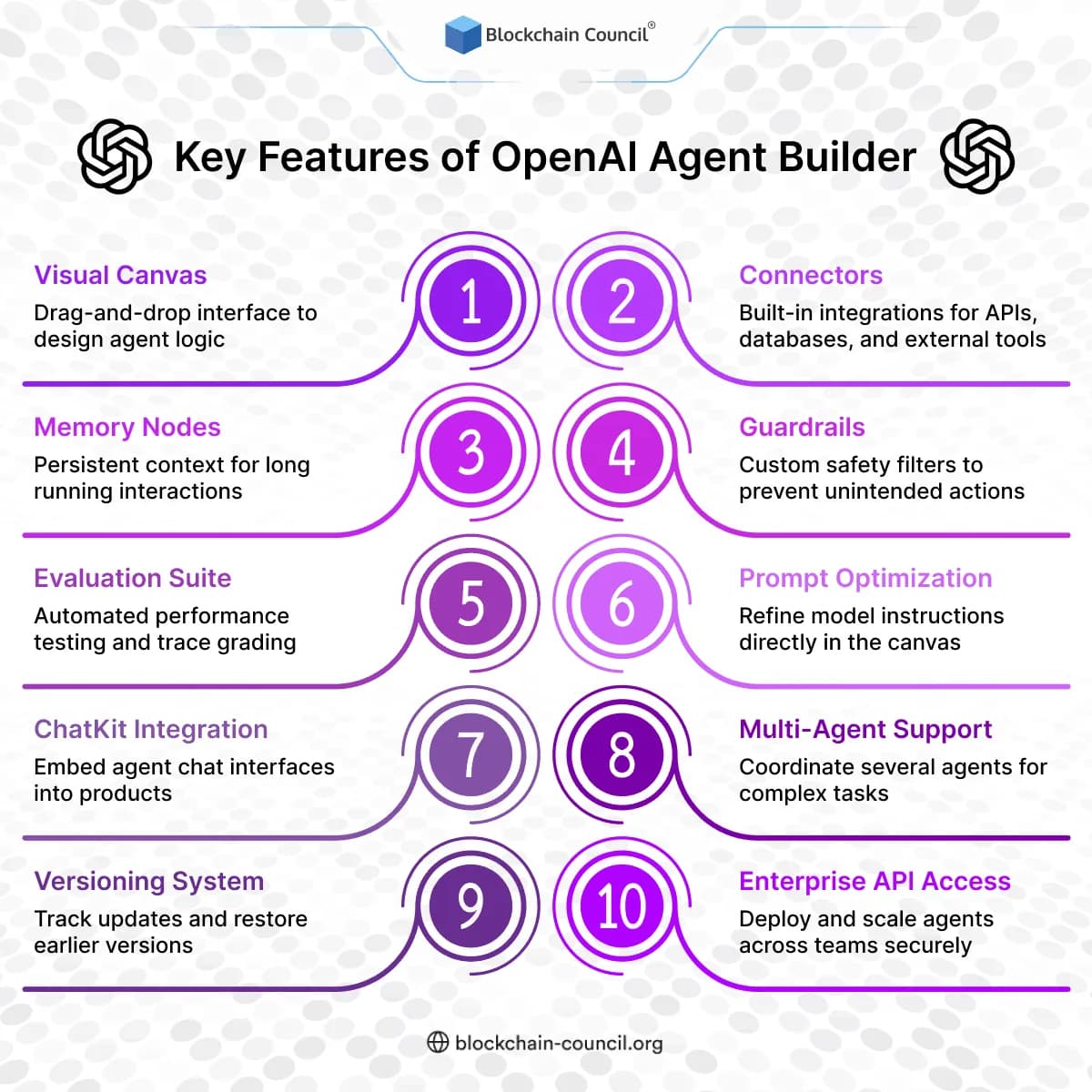
Experts who attended Dev Day confirmed that these features were demonstrated live — a major leap from manually coded frameworks like AutoGPT or CrewAI.
How to Use OpenAI Agent Builder (Step-by-Step)?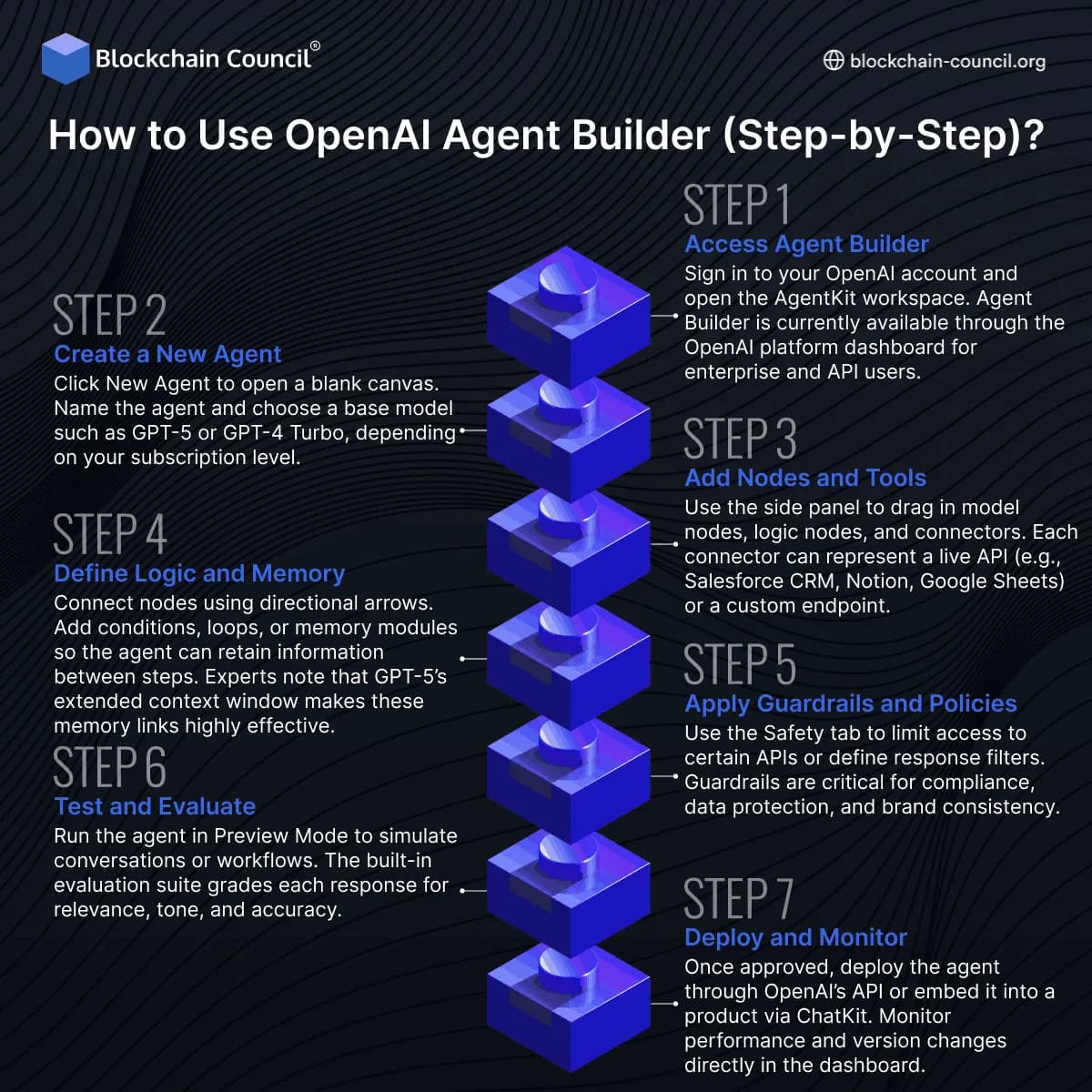
Using Agent Builder is designed to be intuitive, even for non-coders. Experts who tested the Dev Day preview outlined the process below.
Step 1 – Access Agent Builder
Sign in to your OpenAI account and open the AgentKit workspace. Agent Builder is currently available through the OpenAI platform dashboard for enterprise and API users.
Step 2 – Create a New Agent
Click New Agent to open a blank canvas. Name the agent and choose a base model such as GPT-5 or GPT-4 Turbo, depending on your subscription level.
Step 3 – Add Nodes and Tools
Use the side panel to drag in model nodes, logic nodes, and connectors. Each connector can represent a live API (e.g., Salesforce CRM, Notion, Google Sheets) or a custom endpoint.
Step 4 – Define Logic and Memory
Connect nodes using directional arrows. Add conditions, loops, or memory modules so the agent can retain information between steps. Experts note that GPT-5’s extended context window makes these memory links highly effective.
Step 5 – Apply Guardrails and Policies
Use the Safety tab to limit access to certain APIs or define response filters. Guardrails are critical for compliance, data protection, and brand consistency.
Step 6 – Test and Evaluate
Run the agent in Preview Mode to simulate conversations or workflows. The built-in evaluation suite grades each response for relevance, tone, and accuracy.
Step 7 – Deploy and Monitor
Once approved, deploy the agent through OpenAI’s API or embed it into a product via ChatKit. Monitor performance and version changes directly in the dashboard.
Professionals who want to design enterprise-ready workflows like this can benefit from advanced technology courses that teach how AI tools integrate within larger digital ecosystems.
What Makes Agent Builder Different from Custom GPTs?
Custom GPTs let users personalize ChatGPT with static prompts and rules. Agent Builder goes further — it lets developers create autonomous, multi-step systems that interact with data, execute API calls, and make real decisions.
While Custom GPTs live inside ChatGPT, Agent Builder produces deployable agents capable of running independently or within enterprise workflows. Experts highlighted that this marks OpenAI’s evolution from conversational assistants to full operational agents.
How Does Agent Builder Integrate with GPT-5?
GPT-5 is the engine that powers Agent Builder’s reasoning layer. It can process longer context windows, maintain state across turns, and use multiple tools in sequence. Experts noted that GPT-5’s tool-use architecture allows agents to plan and reflect mid-task, reducing errors and improving decision quality.
Those aiming to specialize in prompt-driven reasoning systems can refine their skills through a Prompt Engineering Course, which teaches the techniques used to design such model behaviors.
Why Does Agent Builder Matter for the Future of AI?
Experts believe this launch signals a shift from “AI as a service” to “AI as infrastructure.” Businesses can now create AI agents that act like digital employees — analyzing, summarizing, and responding dynamically.
By giving enterprises a way to automate knowledge tasks safely, Agent Builder opens the door to intelligent workflows across industries like healthcare, education, and finance.
Professionals hoping to lead this change can strengthen their foundation with a Data Science Certification to analyze agent performance and model metrics effectively.
Is Agent Builder Safe to Use?
Yes. OpenAI designed Agent Builder with layered safety controls. Each action an agent takes can be logged, graded, and reversed if needed. Policies can restrict agents from accessing sensitive APIs or performing risky commands.
Experts emphasized that Agent Builder’s guardrails were engineered to meet enterprise compliance standards, ensuring responsible deployment. Learning the ethics and accountability side of AI is equally vital — something covered in Blockchain technology courses focused on traceability and data integrity.
What Are the Limitations of OpenAI Agent Builder?
While powerful, Agent Builder currently faces a few limitations:
- Limited third-party connectors compared to Zapier or LangChain
- High compute costs for large, multi-step workflows
- Requires some understanding of agent design and safety concepts
- Locked within OpenAI’s platform for now, though expansion is expected
Experts advise professionals to begin with structured AI coursework before managing production-level agents, such as an AI certification, to grasp architecture and deployment best practices.
How Can Businesses Use Agent Builder?
Enterprise teams can use Agent Builder to automate customer support, document processing, research synthesis, or workflow management. Experts testing prototypes reported that a single agent could handle tasks across email, CRM, and analytics tools seamlessly.
To connect AI initiatives with measurable ROI, a Marketing and Business Certification helps professionals understand how to align agentic solutions with business outcomes.
The Broader Context: OpenAI’s Shift to Agentic AI
OpenAI’s launch of Agent Builder aligns with a broader trend — moving from single-task models to ecosystems of cooperating agents. These systems reason, plan, and act across digital environments. Experts call this evolution “the agentic era” of AI, where models like GPT-5 serve as intelligent operators instead of passive assistants.
For professionals who want to work at this frontier, mastering emerging technology frameworks is essential to understand how these ecosystems integrate cloud, APIs, and reasoning systems.
Conclusion
OpenAI’s Agent Builder, unveiled at Dev Day 2025 alongside GPT-5, is more than a development tool — it’s the blueprint for how AI will operate in enterprises moving forward. It merges simplicity, safety, and power, allowing teams to build agentic workflows that think, act, and learn.
Experts agree this marks the beginning of AI that doesn’t just converse but collaborates. Those who invest in continuous learning — through certifications in AI, agentic systems, data science, blockchain, and marketing — will shape how the next generation of AI agents transforms work and innovation.